CHAPTER 05
Administration & Security
Design access that stays understandable as the instance grows.
On this page
Faithful English web edition · Original chapter, structure and illustrations from the learning guide.
LEARNING OBJECTIVES
Be able to explain who can do what — and why
By the end, you should be able to create users and groups, calculate additive permissions, restrict specific Models and Knowledge Bases, distinguish a default from a policy, identify permissions equivalent to administrator trust and design access using least privilege.
01. What administration means in Open WebUI
User work begins with “Which model should answer?” Administration begins with a different question: What may each person do inside this instance?
 Enlarge illustration ↗
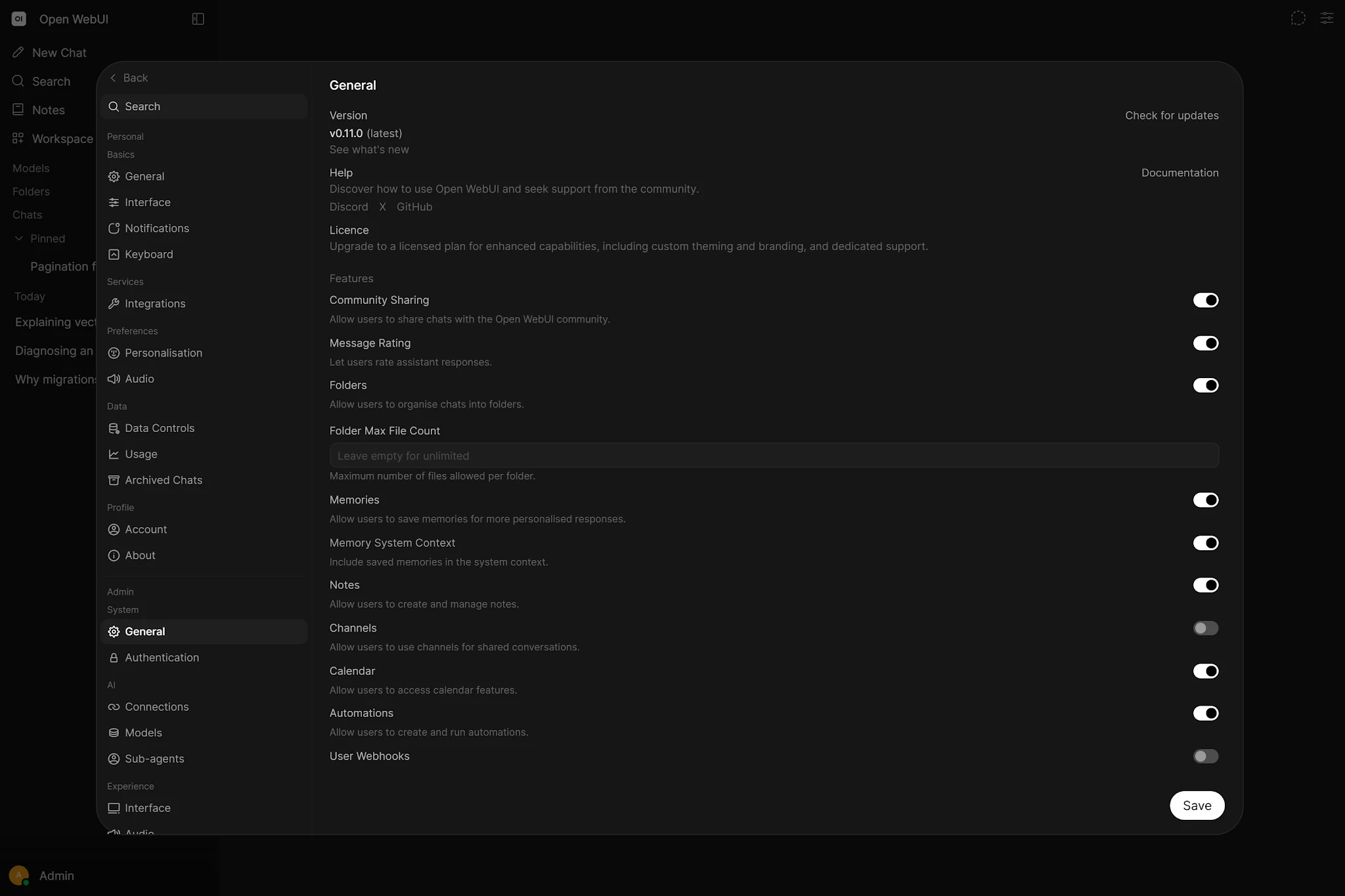
Open WebUI is multi-user by design. Even on a personal server, it separates individual preferences from global configuration because tomorrow the same instance may have more accounts, groups, models and shared resources.
Think of an office: entry to the building does not imply a key to the server room, permission to hire a supplier or authority to read HR documents. Open WebUI separates those decisions digitally.
Identity → Role → Permissions → Groups
→ Resource grants → Effective access- Identity
- Who the account represents.
- Role
- The broad trust class assigned to the account.
- Permission
- Whether a feature or type of operation may be used.
- Group
- A reusable bundle of permissions and resource membership.
- Grant
- Read or Write access to a particular private resource.
“Can I use this feature?” and “Can I access this specific resource?” are separate questions.
02. Roles: Admin, User and Pending
Admin
Admin is the superuser class. It can manage users, groups, connections, global settings and nearly every resource. Administrators may also bypass many resource checks.
Administration does not automatically have to include access to private conversations. Settings such as ENABLE_ADMIN_CHAT_ACCESS should reflect a documented privacy decision.
User
User is the normal account type. Its capabilities come from global defaults, group permissions and resource grants. A developer can have Workspace, Knowledge and approved coding models without becoming Admin; another person may receive only Chat and two curated assistants.
Pending
Pending represents a registered account that has not been approved. It has no normal operating access until an administrator changes its role. For an Internet-facing or shared deployment, DEFAULT_USER_ROLE=pending is a conservative starting point.
03. Permissions and additive RBAC
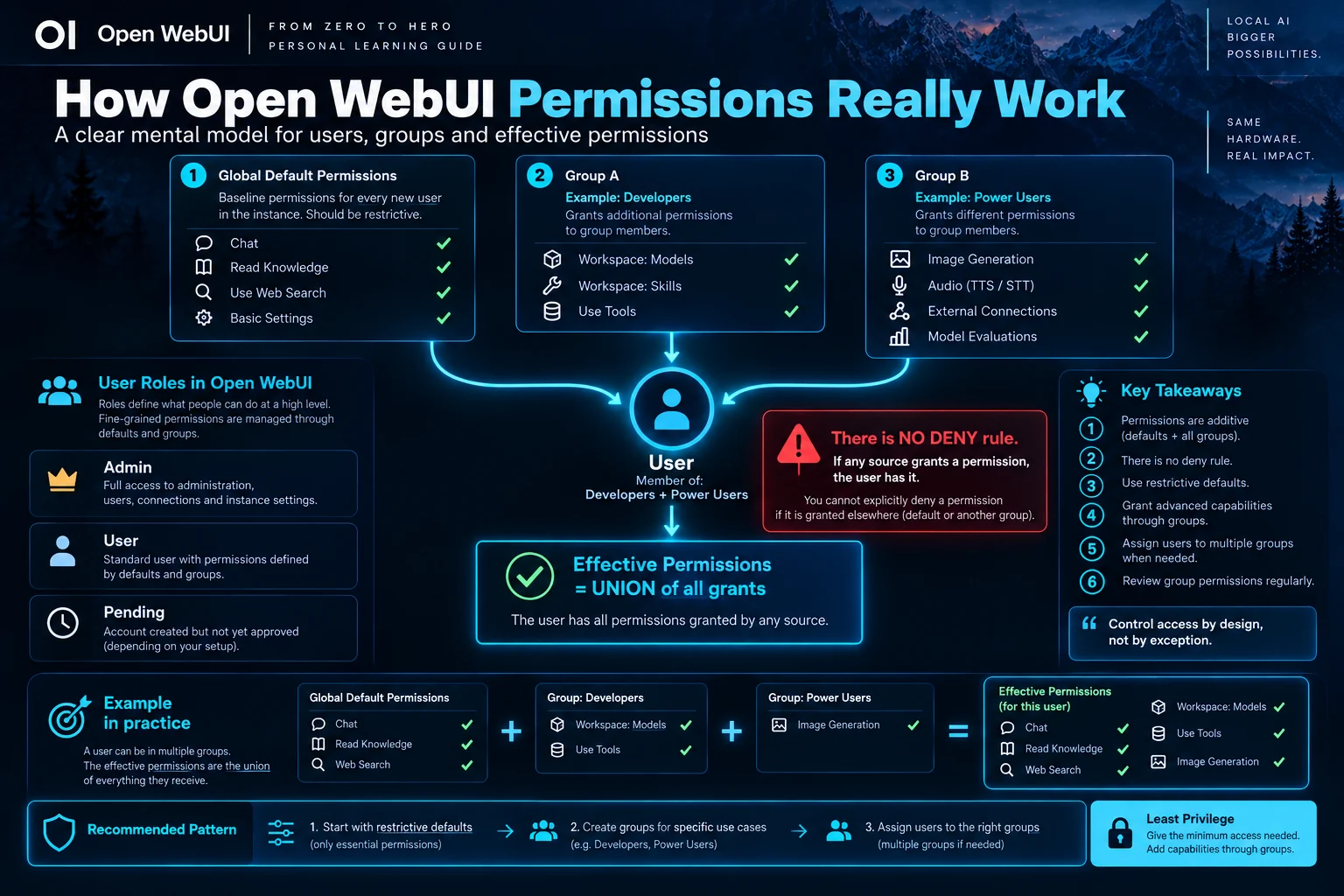
The most important rule in the chapter is that permissions are additive. Effective permissions are the union of global defaults and every group the user belongs to.
 Enlarge illustration ↗
effective permissions =
global defaults ∪ Group A ∪ Group B ∪ Group C …If one source grants a permission, the user has it. A false value in another group does not revoke it. There is no general Deny rule that can cancel a grant from elsewhere.
A simple example
Global Defaults grants Chat and Web Search. Developers adds Workspace Models and Tools. Analysts adds File Upload and Knowledge. A person in Developers and Analysts receives all six capabilities.
If a group called Restricted leaves Tools disabled, that group merely contributes no Tools permission. It cannot remove Tools granted by Developers.
Permission categories
- Workspace
- Create or manage Models, Knowledge, Prompts, Skills and Tools.
- Sharing
- Whether and how resources can be shared.
- Chat
- Operations allowed inside conversations.
- Features
- Web search, image generation, API keys and other instance features.
- Settings
- Access to personal configuration areas such as Interface Settings.
04. Groups: permission bundles and resource principals
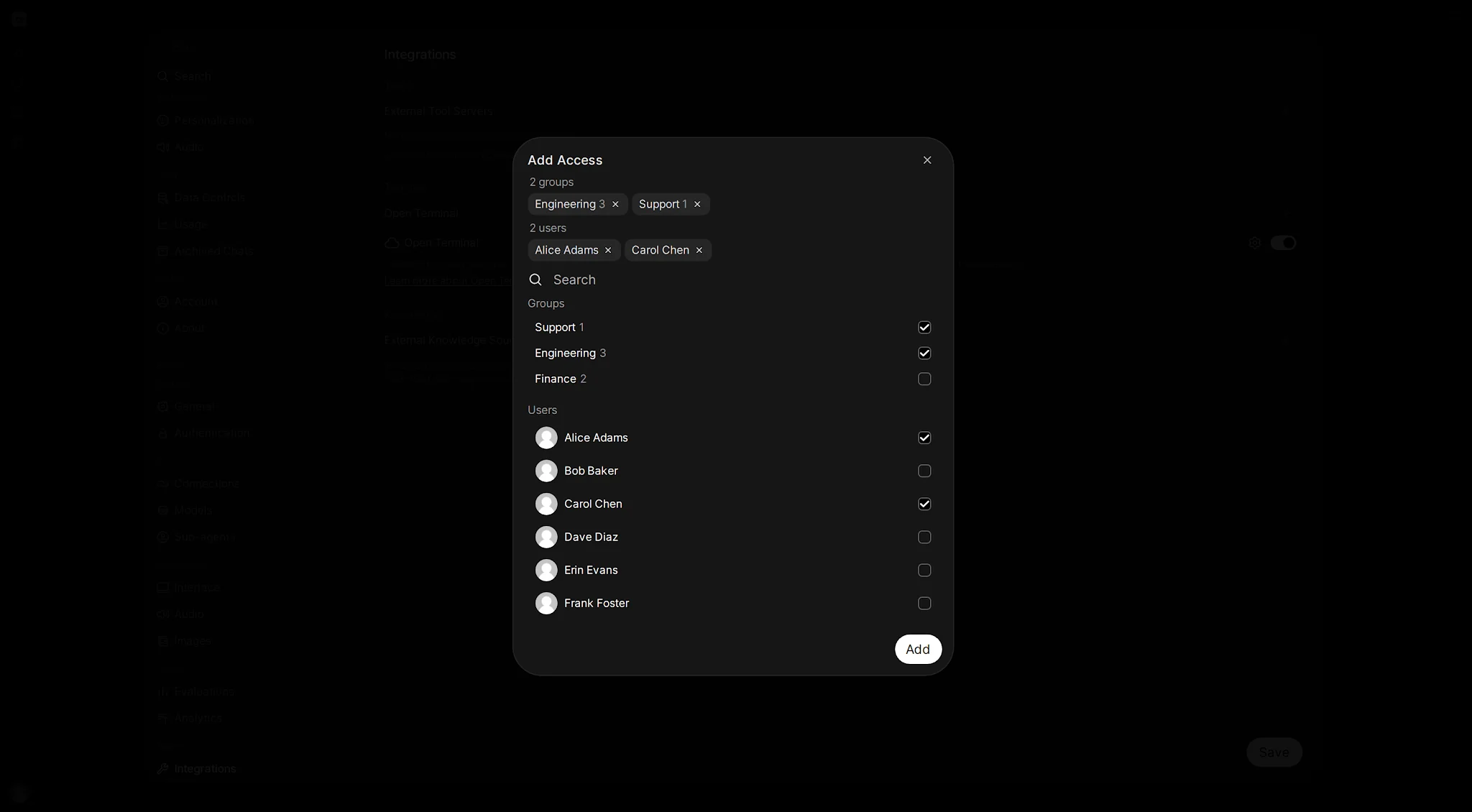
Groups perform two jobs. They add functional permissions, and they can receive access to specific private resources.
 Enlarge illustration ↗
Permission bundles
Instead of editing twenty accounts, create Developers and grant the capabilities needed for that function. Add or remove people from the group. When policy changes, update one bundle.
Resource principals
Finance can receive Read access to a financial-analysis model and a private policy Knowledge Base. Engineering can receive different coding models. Two users can have similar functional permissions while seeing completely different resources.
Read, Write and ownership
Read normally permits viewing or use. Write permits modification or deletion where supported. Ownership can also preserve access. Keep the two layers distinct:
Permission: “You may use this type of feature.” Grant: “You may access this particular object.”
Preview Access
Once users belong to multiple groups, it becomes difficult to reconstruct access mentally. Use Preview Access after important changes and during audits to see the effective Models, Knowledge Bases and Tools for a user or group.
05. Resource access: Models, Knowledge and Tools
Public versus private
A public resource is available to people who have the corresponding functional capability. A private resource also requires a Read or Write grant to a user or group.
A person may have Knowledge Access but no Read grant for “HR Confidential”. The functional permission opens the category; the grant opens this object.
Model access control
Workspace Models can be restricted to named users and groups, allowing one instance to serve different departments. Keep BYPASS_MODEL_ACCESS_CONTROL=false when those boundaries must apply.
Bound Tools and Knowledge
A Model can have a Tool or Knowledge collection attached, but that does not necessarily grant the user access to the underlying resource. A common failure is a visible Model whose Tool fails because the user lacks Read access to that Tool.
06. Model visibility, defaults and user experience
Not every Admin control is a restriction. Some values curate the starting experience; others enforce policy.
Defaults are not restrictions
user override → instance default → built-in defaultA user who already saved a personal preference can continue to see it after an administrator changes the instance default. If the value must be enforced, remove Interface Settings Access for the relevant users so they cannot store personal overrides. Administrators remain exempt.
Selected, Pinned and visible
Selected and Pinned Models arrange the shop window: the starting selection and convenient shortcuts. Access control and grants determine which products are actually behind the door.
07. Security boundaries: what Open WebUI controls
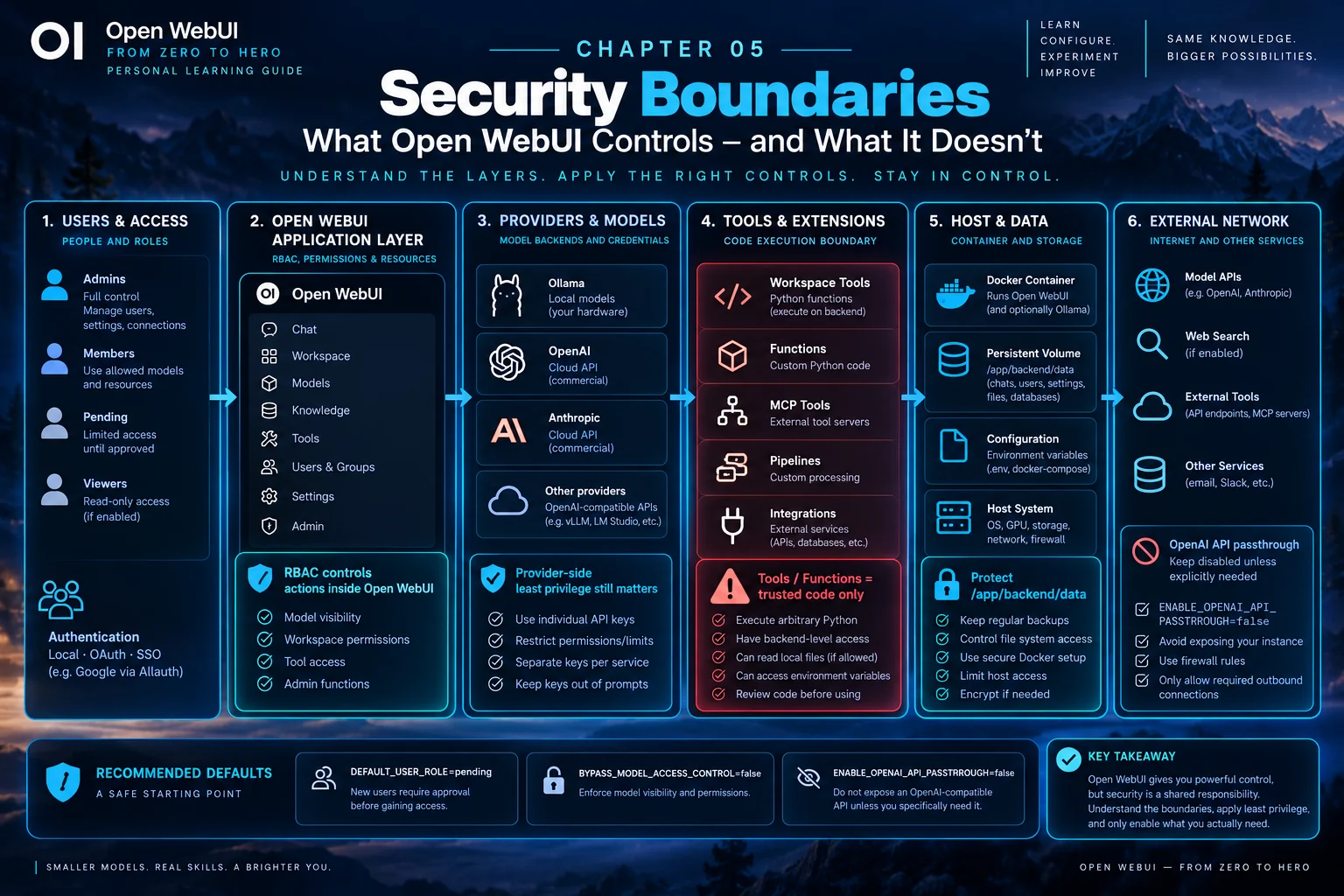
RBAC protects the application layer. A secure deployment also accounts for providers, executable extensions, containers, storage, hosts and external networks.
 Enlarge illustration ↗
Application boundary
Roles, permissions, groups and grants control who can open Workspace, use web search, access a private Model or manage a Knowledge Base.
Provider boundary
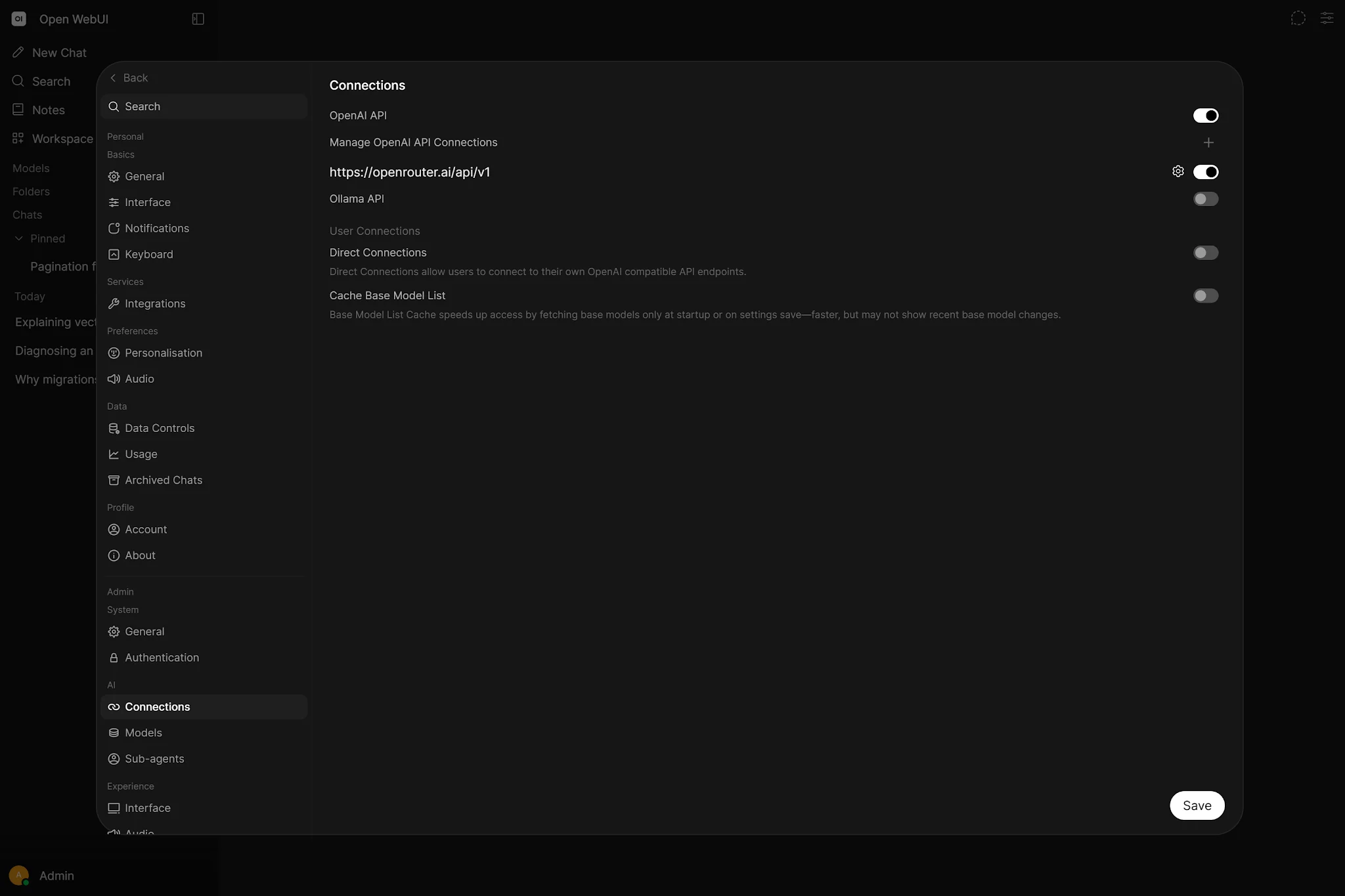
If Open WebUI calls an upstream service with an administrative key, application RBAC does not magically narrow that provider credential. Apply scopes, limits and separate keys in Ollama gateways, LiteLLM or commercial APIs.
 Enlarge illustration ↗
Host and Docker boundary
Any file, environment variable or network route available to the backend may also become reachable by trusted executable extensions. Restrict mounts, filesystem permissions, firewall rules and container privileges.
Data-volume boundary
/app/backend/data contains critical state. Unauthorised write access can compromise the application. Back it up, isolate it and grant access only to the processes that require it.
External-service boundary
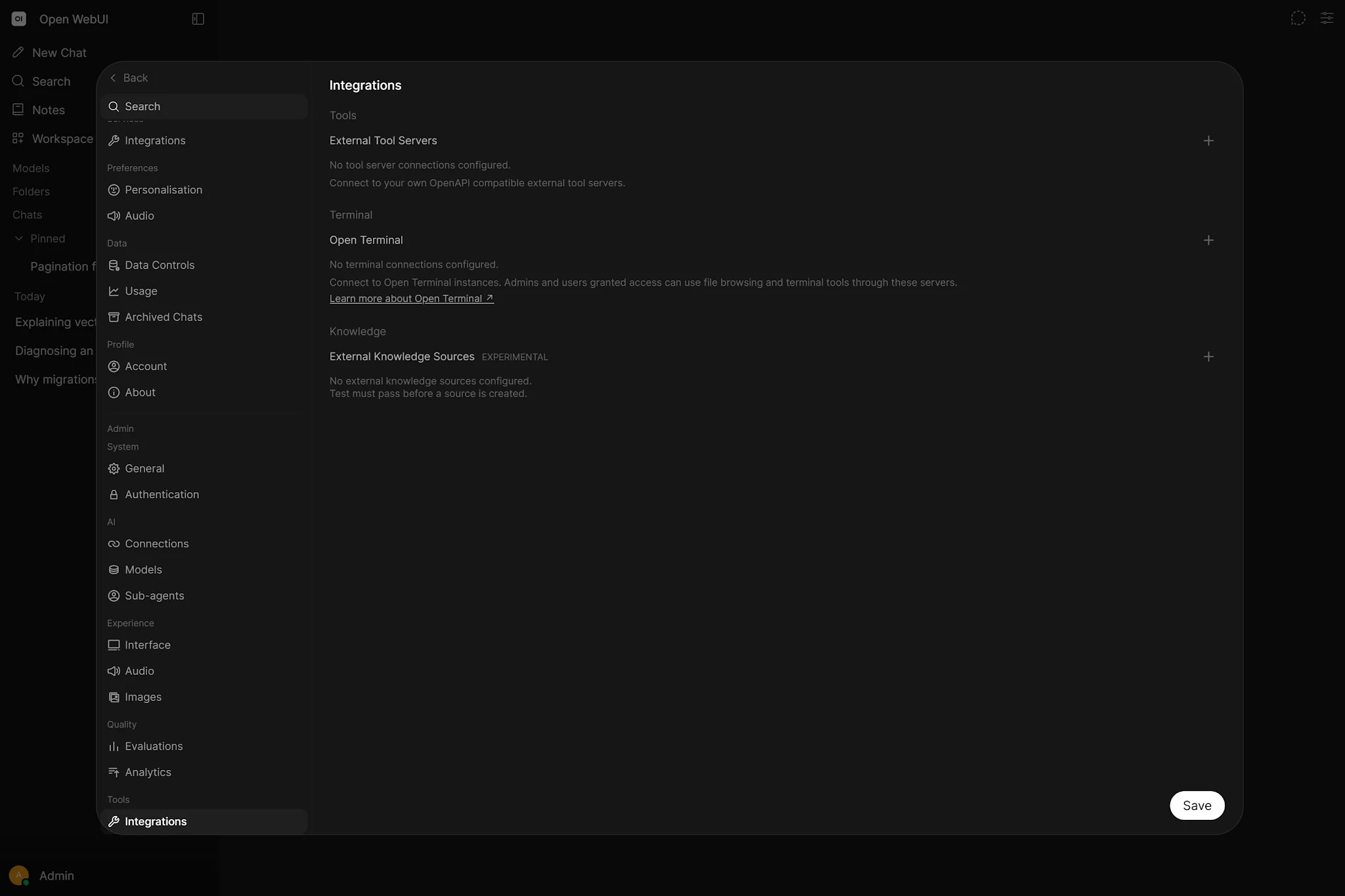
MCP servers, OpenAPI endpoints, web search, email, Slack, GitHub and other services retain their own credentials and authorisation. A Tool grant does not replace provider-side access control.
08. Tools, Functions and dangerous permissions
Workspace Tools and Functions can execute Python on the backend. They are not harmless snippets inside a guaranteed application sandbox.
 Enlarge illustration ↗
Creating or importing Tools is different from using an approved Tool. A normal user can receive Read access to one reviewed Tool without the authority to upload new Python.
Functions are restricted to administrators because they can intercept messages, behave as models, add actions or alter platform flows.
Featured does not mean audited
- Trust: Do you know the author and repository?
- Read: Have you reviewed the code and dependencies?
- Secrets: Which environment variables or credentials can it access?
- Network: Which hosts can it reach?
- Files: Which filesystem locations can the backend read or write?
09. Conservative hardening defaults
DEFAULT_USER_ROLE=pending
BYPASS_MODEL_ACCESS_CONTROL=false
ENABLE_OPENAI_API_PASSTHROUGH=false
The first setting keeps new registrations inactive until approval. The second preserves model-level boundaries. The third avoids exposing a generic OpenAI-compatible passthrough backed by administrative provider credentials.
Admin chat access
ENABLE_ADMIN_CHAT_ACCESS determines whether administrators can access other users' chats. Treat it as a documented privacy choice.
Admin access bypass
BYPASS_ADMIN_ACCESS_CONTROL makes administration convenient but emphasises how wide the Admin role is. Keep the administrator population small.
API keys
A normal user normally needs both the feature enabled globally and the corresponding permission. Admin behaviour can differ. Review both gates when diagnosing access.
10. Practical team designs
Personal homelab
- One Admin.
- No public signup, or new accounts start Pending.
- Install Tools only after code review.
- Keep provider secrets outside prompts and documents.
Small trusted team
- One or two Administrators maintain the instance.
- Standard Users receive Chat and approved resources.
- Creators can manage Models, Knowledge and Prompts.
- A very small Tool Admins group can create or import server-side Tools.
Department-based access
- Engineering receives coding models and technical Knowledge.
- Operations receives runbooks and operational analysis.
- Finance receives private financial resources.
- Everyone receives approved general assistants.
People can belong to several groups and receive the union. Never use a group with the intention of “denying” something granted elsewhere.
11. Troubleshooting access problems
| Symptom | What to inspect |
|---|---|
| User sees something that should be restricted | Global Defaults, every group and direct resource grants. One grant is enough. |
| Removing a group toggle changed nothing | Another group or the global baseline still grants it; there is no Deny. |
| Model is visible but its Tool fails | The user may lack Read access to the Tool itself. |
| A changed default does not alter the interface | The user may have a stored personal override. |
| A shared Model remains invisible | Check that it is active, the feature permission exists and the Read grant is effective. |
| A group must remove a globally granted feature | Remove it from Global Defaults, then grant it only through allowed groups. |
12. Administration checklist
Healthy administration means you can explain who has access, why, which source grants it and what changes when a group or grant is removed.
- New accounts begin with a safe role.
- Global Defaults contains only genuinely common capabilities.
- Advanced permissions come from specific functional groups.
- Every private Model has an explainable audience.
workspace.toolsis limited to administrator-equivalent trust.- Tool, Function and pipeline code is reviewed before installation.
- Provider keys follow least privilege outside Open WebUI.
- The data volume is protected and backed up.
- OpenAI API passthrough stays disabled unless explicitly required.
- Preview Access is used after important RBAC changes.
PRACTICAL CHECKPOINT
Can you calculate effective access?
- A user belongs to two groups; one grants Web Search and one does not. Does the user have it?
- Only Developers should create Models. Where should the permission start?
- A private Model is shared with Finance. Is generic Models Access enough?
- Why is authoring Workspace Tools far more sensitive than using one approved Tool?
- Which boundaries remain outside Open WebUI RBAC?
Check your answers
Yes, the grant is additive. Disable the capability globally and grant it through Developers. A private resource also needs the appropriate grant. Tool authoring can execute backend code. Provider credentials, containers, host files, networks and external services retain their own controls.
13. Essential vocabulary
- Role
- The account class: Admin, User or Pending.
- Permission
- A functional capability inside Open WebUI.
- Group
- Users organised to receive permissions and resource access.
- Grant
- Read or Write access to a specific resource.
- RBAC
- Role-Based Access Control.
- Least privilege
- Grant only the minimum access required.
- Effective access
- The final union of applicable defaults, groups and grants.
- Default
- An inherited starting value, not necessarily a restriction.
- Bypass
- A configuration that ignores an access-control layer.
- Security boundary
- A point where ownership of policy or credentials changes.
Source and further reading
This edition preserves the chapter's teaching sequence and examples. Screenshots reflect the source edition; controls may move between releases.
Open the original chapter ↗Open WebUI RBAC ↗Open WebUI security ↗