CHAPTER 01
What Is Open WebUI?
A practical tour of Chat, Workspace, Settings and Admin.
On this page
Faithful English web edition · Original chapter, structure and illustrations from the learning guide.
LEARNING OBJECTIVES
Navigate by responsibility, not muscle memory
At the end of this chapter you should know what belongs to Chat, Workspace, Settings and Admin. Interface positions change; a responsibility-based map keeps working.
01. The four surfaces
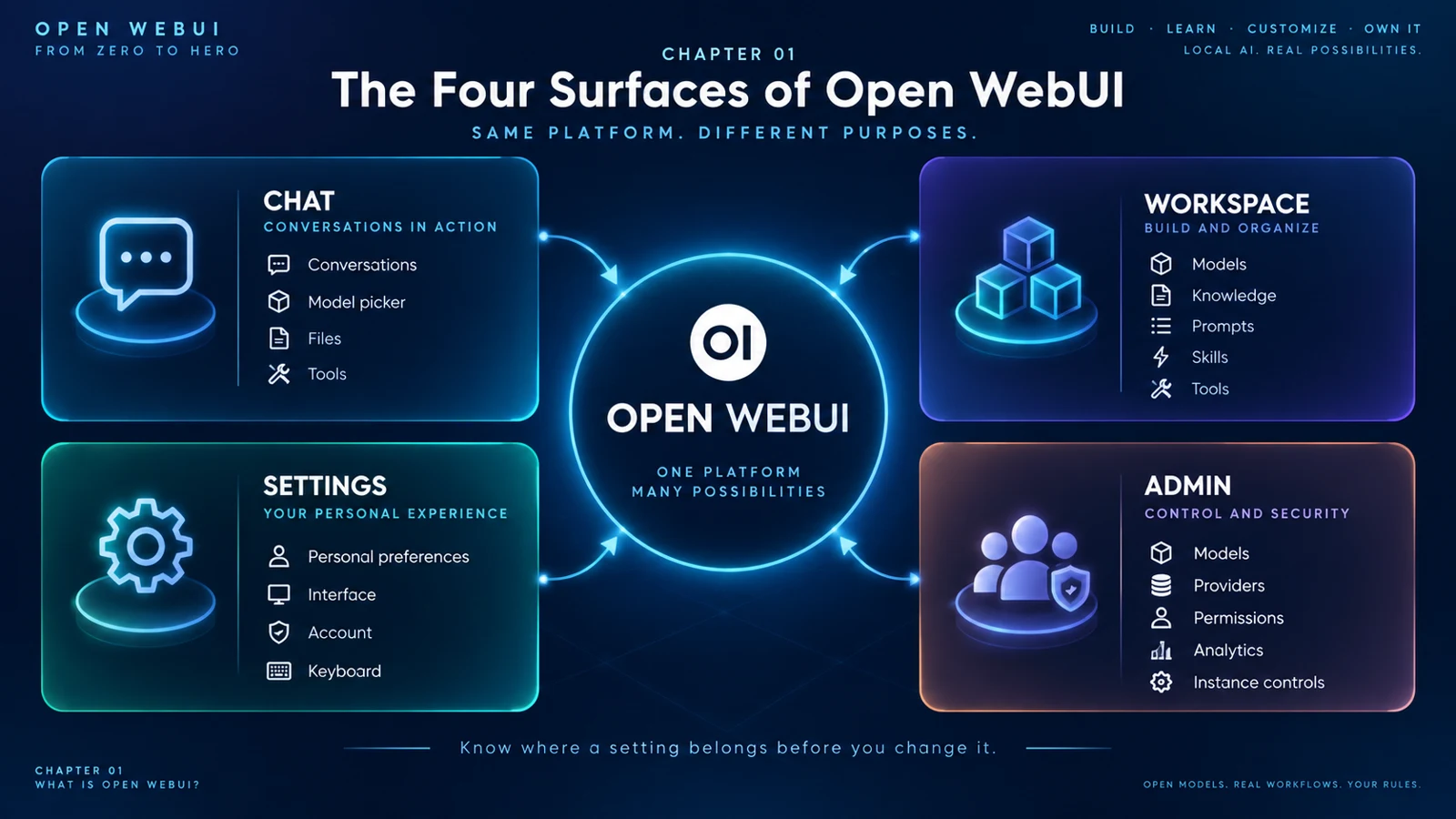
Open WebUI becomes easier when you begin with four questions: do I want to work now, build something reusable, change my personal experience or administer the shared instance?
 Enlarge illustration ↗
| Surface | Responsibility | Typical action |
|---|---|---|
| Chat | Use capabilities in a conversation | Ask, attach a file or enable an integration |
| Workspace | Build reusable components | Create a specialist assistant or Knowledge collection |
| Settings | Change your own experience | Adjust interface, account or keyboard preferences |
| Admin | Govern the whole instance | Connect providers, set permissions and curate models |
If an option can affect other people, it probably belongs to Admin. If it is reusable across future chats, it probably belongs to Workspace.
02. The Chat surface
Chat is the operational surface where models, files, search, audio, images, memory and connections meet. Start with a plain conversation and add capabilities only when they solve a specific need.
New Chat means new context
A chat is more than an input box. It retains history, model selection, attachments, enabled tools and other conversation state. Start a new chat when a task should not inherit the previous one or when a long history is consuming the context budget.
The message input
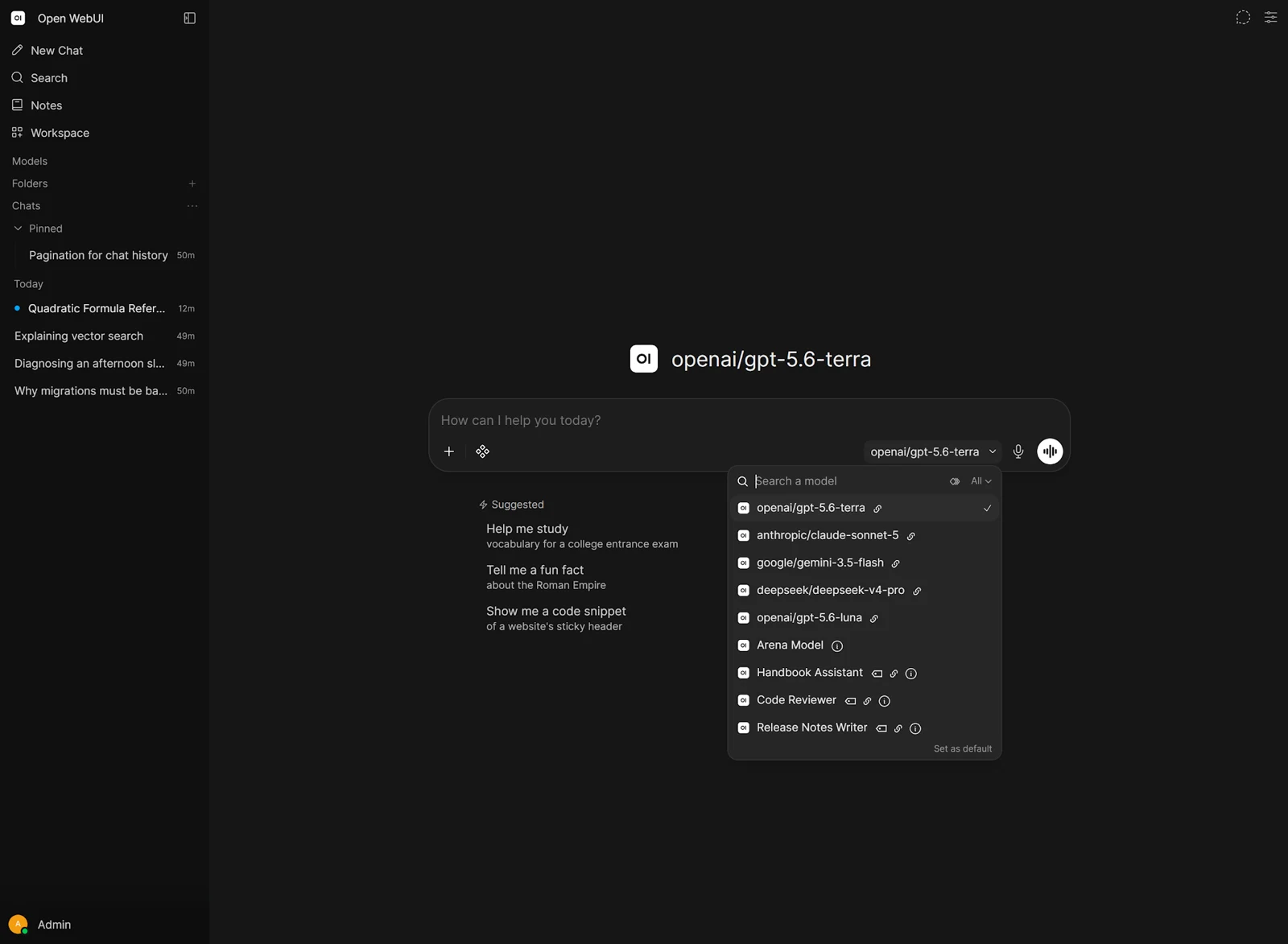
In the current interface, the model picker sits close to the composer because the model, files and integrations are all decisions about the next request. Available controls vary with the user's permissions and the selected model's capabilities.
The input represents text plus the immediate configuration of the request.
03. The model picker
The picker decides which base model or configured assistant will answer. A local installation may list Ollama models; a hybrid deployment can also include remote providers and Workspace Models.
 Enlarge illustration ↗
Base model versus Workspace Model
A base model is the actual model exposed by a provider. A Workspace Model wraps one with reusable instructions, parameters, Knowledge, Tools and Skills. It does not fine-tune or duplicate the weights.
base model + system prompt + parameters + Knowledge + Tools + Skills
= Workspace Model
Selected, Pinned and personal defaults
Selected Models give new users a starting choice. Pinned Models seed sidebar shortcuts. A user can also choose a personal default. None of these is an access restriction: visibility and access control decide which models the user can actually open.
05. Workspace: reusable AI components
Workspace is where Open WebUI stops being only a chat interface and becomes a platform you can assemble.
- Models
- Reusable assistants built over a base model, with instructions, parameters, resources and access control.
- Knowledge
- Documents and collections used through focused retrieval or full context.
- Prompts
- Reusable templates, often invoked as slash commands and capable of accepting variables.
- Skills
- Markdown instructions that teach a method. They guide behaviour but do not execute code.
- Tools
- Executable capabilities for APIs, code, search and external services.
A Code Reviewer, for example, can combine a coding model, a review prompt, a security Skill, internal standards in Knowledge and a tightly scoped repository Tool.
06. Settings: your personal experience
Settings answers: “How should Open WebUI behave for me?” It includes account, interface, chat, keyboard, files, audio and other preferences.
Administrators can define default interface settings, but defaults are starting values. Where overrides are allowed, Open WebUI resolves a personal choice first, then the instance default, then its built-in default.
user preference → instance default → built-in defaultIf a change should affect only you, start in Settings. If it must affect the whole server, look to Admin.
07. Admin: instance-wide control
Admin is the operator surface. In current releases it appears inside Settings, but its scope remains distinct: provider connections, model visibility, defaults, permissions, task models, analytics and policy.
Connections and providers
This is where Ollama and compatible APIs are connected. If the UI loads but a model is absent, the problem may be here rather than in Chat.
Models and shared defaults
Admins curate which models are visible, set Selected and Pinned starting points, and define global capability or parameter defaults.
Permissions
Permissions cover Workspace, sharing, chat, features and settings. Two users can therefore see different controls in the same instance.
Task Models
Open WebUI uses small background model calls for titles, tags, follow-up suggestions, autocomplete, query rewriting and context compaction. A small, fast Task Model prevents these jobs from competing unnecessarily with the main conversation model.
08. @, /, files and integrations
@ attaches context
The @ menu can bring models, folders, Knowledge collections and files into a conversation. Think: “Which context or resource should join this chat?”
/ invokes commands and reusable actions
The slash menu surfaces saved prompts, Skills and built-in commands. Think: “Which template or action should run?”
Files do not always mean full context
Depending on configuration, an attached document may use Focused Retrieval or Full Context. One searches for relevant passages; the other consumes context for the complete document.
Skills versus Tools
A Skill supplies instructions. A Tool supplies executable capability. Both may appear under integrations, but their trust and operational behaviour are different.
09. A first-session walkthrough
- Open New Chat. Do not configure anything else yet.
- Choose one familiar model. Determine whether it is a base model or a Workspace Model.
- Send a short question and prove inference works before adding RAG or Tools.
- Locate chat history, Folders, Notes, Workspace and pinned models in the sidebar.
- Explore Models, Knowledge, Prompts, Skills and Tools in Workspace without changing them.
- Open Settings and distinguish personal preferences from the Admin section.
- If you are an admin, inspect Connections and Models to understand what feeds the picker.
- Return to Chat and attach one small file or capability only after the baseline works.
 Enlarge illustration ↗
This order matters. Enabling retrieval, web search, several tools and a custom agent simultaneously creates too many possible failure points.
10. A mental model for finding any feature
Scope first → surface second → feature third.
PRACTICAL CHECKPOINT
Can you name the surface before the menu?
- Where would you build a reusable Code Reviewer with instructions and Tools?
- Where would you change your personal interface behaviour?
- Where would you connect a new Ollama server?
- What is the difference between selecting a base model and a Workspace Model?
- Why does “Selected Model” not mean restricted access?
- When would you use @, and when would you use /?
11. Essential vocabulary
- Chat
- The conversation and operational surface.
- Workspace
- The authoring area for Models, Knowledge, Prompts, Skills and Tools.
- Base model
- The real model exposed by Ollama or another provider.
- Workspace Model
- A reusable configuration wrapping a base model.
- Selected
- An instance-level initial choice, not an access restriction.
- Pinned
- An initial sidebar shortcut.
- Skill
- Reusable Markdown instructions that do not execute code.
- Tool
- An executable capability a model can request.
Source and further reading
This edition preserves the chapter's teaching sequence and examples. Screenshots reflect the source edition; controls may move between releases.
Open the original chapter ↗Open WebUI features ↗Workspace documentation ↗