CHAPTER 03
Understanding Local LLMs
Choose a local model with evidence instead of folklore.
On this page
Faithful English web edition · Original chapter, structure and illustrations from the learning guide.
LEARNING OBJECTIVES
Turn model names into practical decisions
By the end, you should be able to read a model page, distinguish size from quantisation, explain why a 7 GB file does not simply equal 7 GB of VRAM, understand what consumes context and reject models that do not fit your hardware or task.
01. What an LLM actually does
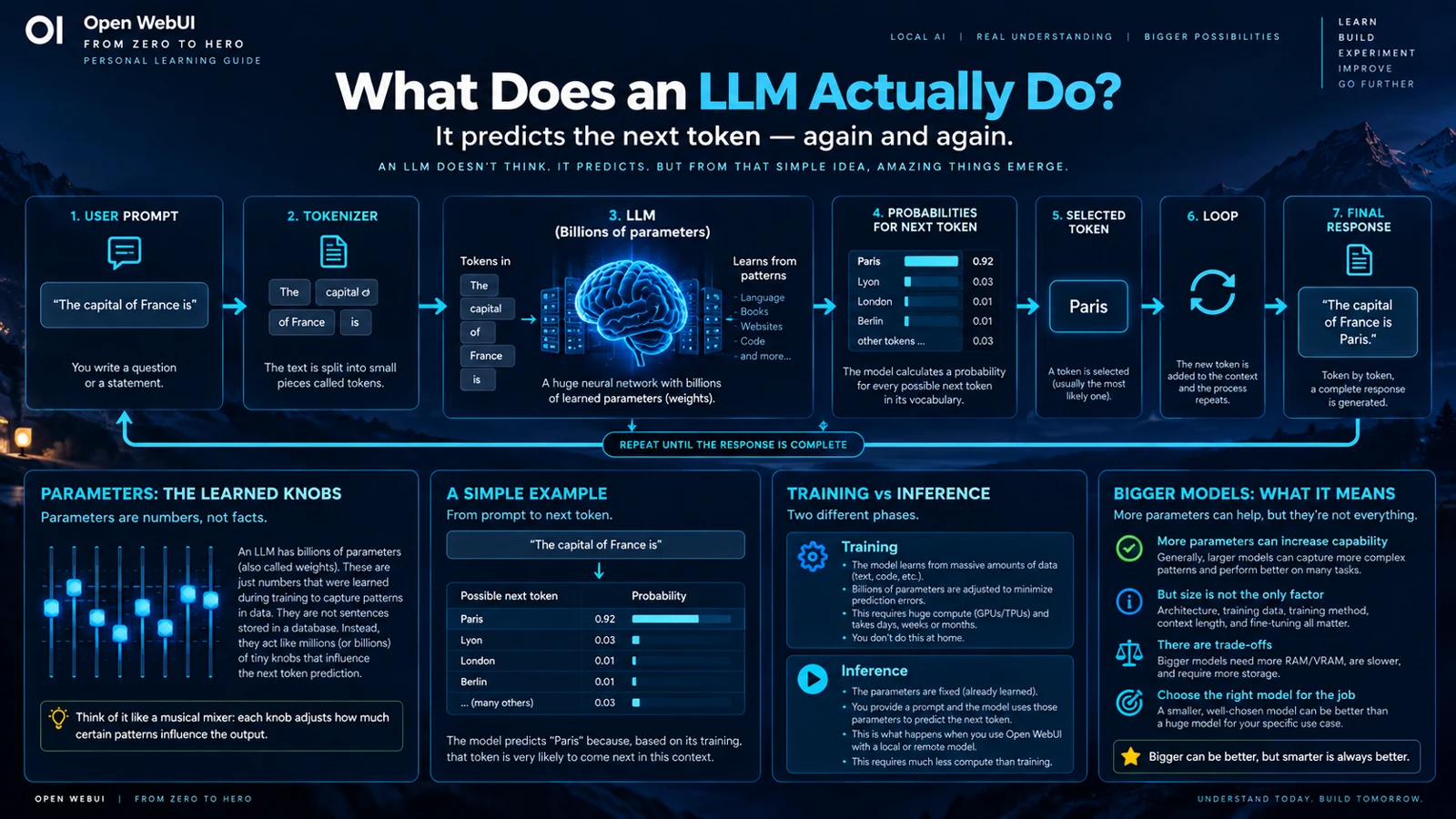
A Large Language Model receives a sequence of tokens and calculates a probability distribution for the next token. It selects one, appends it and repeats. A complete answer emerges from that loop running quickly many times.
 Enlarge illustration ↗
The model is not consulting a row named “France” in a conventional database. Training encoded statistical patterns into billions of numeric parameters. Those patterns can support summarisation, combination, code and reasoning, but they do not guarantee factual retrieval.
Generation is normally probabilistic. Sampling settings determine whether the runtime consistently chooses the highest-probability token or allows plausible alternatives.
02. Tokens: the units the model reads
People write words; models process token identifiers. A token may represent a full word, part of a word, punctuation, whitespace or a sequence of characters. Code, JSON and different languages can produce very different token counts.
A 32K context window means approximately 32,000 tokens, not words or characters.
The same budget contains more than the current question:
system instructions + history + current prompt + files/RAG
+ tool schemas + tool results + generated output ≤ context
An agent with twenty tool schemas can have substantially less room for your source code than the same model in a blank chat. Context is shared working space.
03. Parameters: 3B, 8B, 14B and 70B
B means billion. An 8B model has roughly eight billion learned parameters. More parameters often provide greater capacity, but size alone does not establish quality. Architecture, training data, fine-tuning, tokenizer, tool training, licence and model age all matter.
Weights need memory. A rough educational estimate is:
weight storage ≈ parameters × bits per weight ÷ 8Real files include metadata, mixed-precision tensors and architectural details, so this is a mental model rather than a capacity calculator.
04. Training versus inference
| Stage | What happens | Typical scale |
|---|---|---|
| Training | Data and error signals alter the model's parameters. | Very high compute, time and data cost. |
| Inference | Already learned weights produce tokens from an input. | What Ollama and Open WebUI do during normal use. |
Downloading a quantised GGUF and running it locally is inference. You are not training the model merely because it is executing on your own GPU.
05. How to read a local model name
 Enlarge illustration ↗
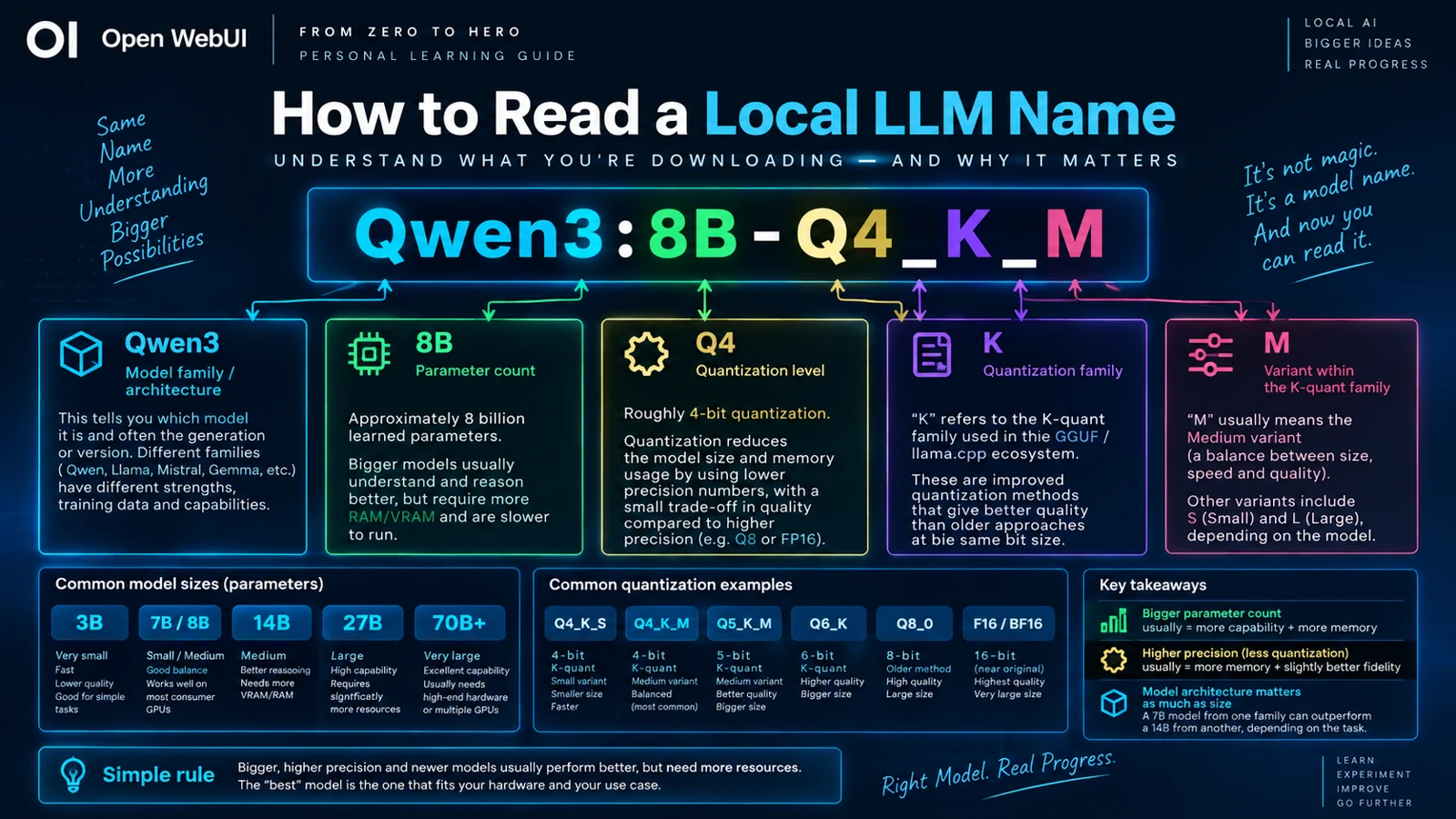
- Family
- Qwen, Llama, Gemma, Mistral, Phi, DeepSeek and others identify architecture, generation, tokenizer, licence and ecosystem.
- Size
- 8B, 14B, 32B or 70B usually indicates approximate total parameters.
- Specialisation
- Instruct, Chat, Coder, Vision, Thinking and Embedding labels indicate intended use. A Base model is not automatically the right chat model.
- Quantisation
- Q4_K_M, Q5_K_M, Q6_K, Q8_0, BF16 or FP16 describes weight representation and heavily affects storage.
Publisher tags are not perfectly standard. Read the model card rather than inferring every capability from the name.
06. Quantisation: Q4, Q5, Q6, Q8 and FP16
Quantisation stores weights at lower numeric precision, reducing size and memory. FP16 or BF16 preserves high precision; Q8 reduces memory with little typical quality loss; Q6 and Q5 reduce further; Q4 is a popular local-inference compromise. Very aggressive Q3 or Q2 variants can degrade more noticeably.
A concrete llama.cpp example for one 8B architecture shows the order of magnitude: Q4_K_S around 4.36 GiB, Q4_K_M around 4.58 GiB, Q5_K_M around 5.33 GiB, Q6_K around 6.14 GiB and Q8_0 around 7.95 GiB. These are examples, not universal constants.
K-quants and S/M/L
The K in Q4_K_M refers to a block-based quantisation family. S, M and L variants use different size/precision mixtures: S tends toward smaller files, M is a common balance and L preserves more information. Not every level offers every suffix.
Quantisation does not change parameter count: an 8B Q4 remains an 8B model. Also avoid requantising an already quantised file when a higher-quality source exists.
07. GGUF, Safetensors and Ollama Modelfiles
GGUF is a format, not a precision
GGUF commonly packages weights, metadata and tokenizer information for llama.cpp-compatible runtimes. A file can be GGUF Q4_K_M or GGUF Q8_0: the first term answers “which container format?” and the second “which weight precision?”
Safetensors
Safetensors is common in the Hugging Face and PyTorch ecosystem. It may contain higher-precision weights or work with other quantisation systems. Ollama can import supported Safetensors architectures as well as GGUF files.
Modelfile
An Ollama Modelfile is a recipe, not the weights. It selects a base and applies a template, system prompt, context and parameters.
FROM qwen3:8b
PARAMETER num_ctx 8192
PARAMETER temperature 0.3
PARAMETER top_p 0.9
SYSTEM You are a concise software-development tutor.
Use ollama show --modelfile model-name to inspect a model's recipe.
08. VRAM, RAM and disk are different resources
 Enlarge illustration ↗
- Disk
- Stores downloaded files when they are not running.
- System RAM
- Holds host workloads and can carry CPU-offloaded model layers.
- VRAM
- GPU memory for weights, KV cache, runtime allocations and active work.
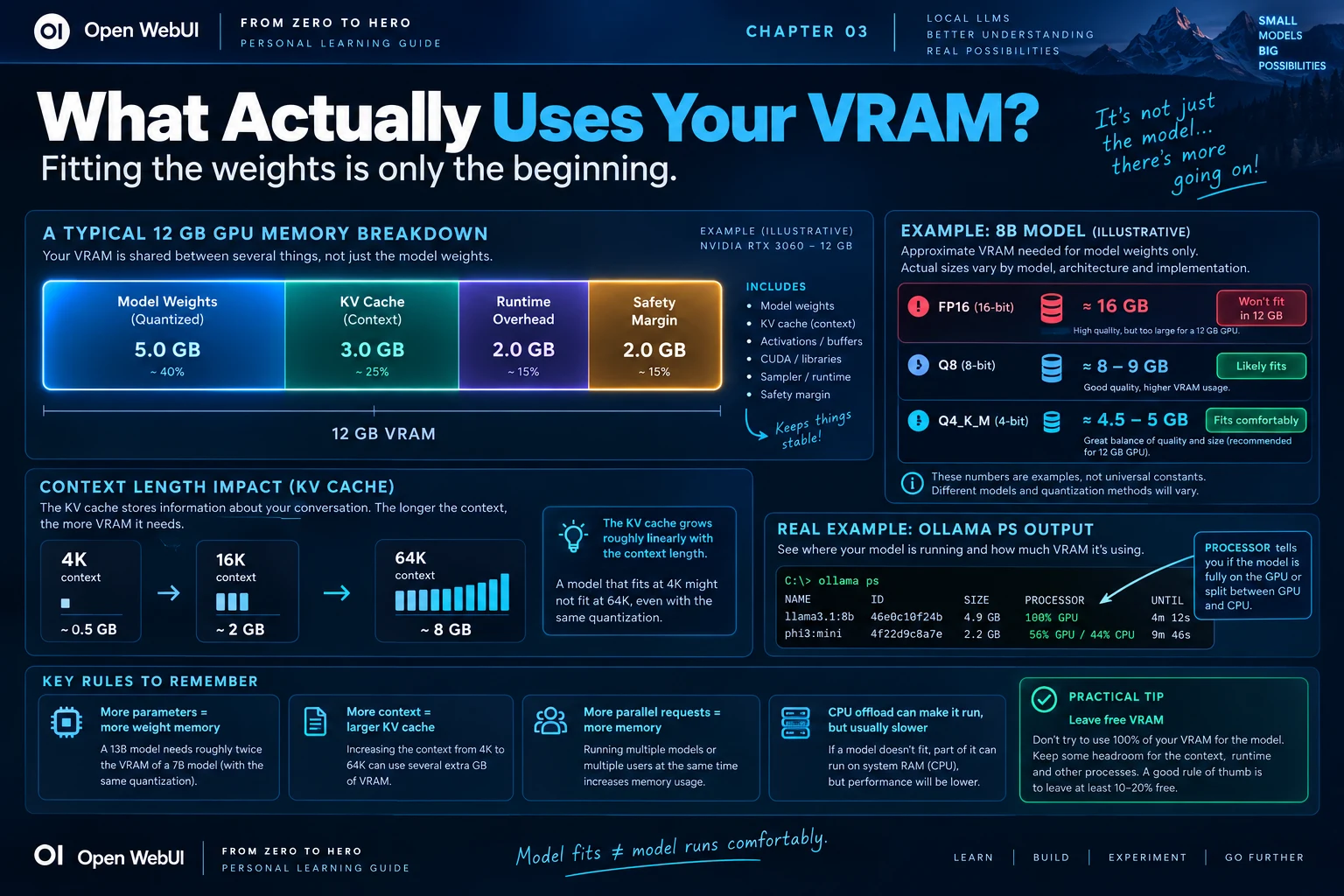
A 5 GB file does not guarantee exactly 5 GB of VRAM use. The runtime needs cache, buffers and temporary structures. Leave headroom for longer context, parallel requests and other GPU workloads.
Use ollama ps to see whether the runtime placed a model on GPU, CPU or both. nvidia-smi shows GPU memory and process activity, but ollama ps explains the model's allocation directly.
09. Context window and the KV cache
The model's advertised maximum and the context actually allocated by your runtime are different. A model can support 128K and run at 4K because that is the configured budget.
Attention state is stored in a KV cache during inference. Longer active context generally grows that cache, so a model that fits at 4K may exceed VRAM at 64K. Context also adds prompt-processing time.
Context is not output length
num_ctx controls the working window. num_predict limits generated tokens. Output still occupies part of the finite context relationship.
OLLAMA_CONTEXT_LENGTH=8192 ollama serve

# Or in a Modelfile
PARAMETER num_ctx 8192
Do not maximise context simply because the model card lists a large number. Increase it for a demonstrated use case and watch memory and performance.
10. GPU offload and unexpected slowness
When weights and cache do not fit in VRAM, the runtime can place layers in system RAM and perform part of the work on the CPU. The model may run, but communication and CPU computation can make it much slower.
Think of VRAM as a fast kitchen counter and system RAM as a storeroom down the hall. Cooking is possible when ingredients are split, but every trip adds delay.
100% GPU is usually the most responsive interactive experience. Partial CPU/GPU placement may be acceptable for batch work where capacity matters more than latency.
11. Model families and specialisations
- General Instruct
- Conversation, writing and mixed analysis.
- Reasoning
- Multi-step planning and mathematics, often with higher latency.
- Coder
- Code generation, repositories, debugging and sometimes fill-in-the-middle.
- Vision
- Images and, depending on the architecture, other media.
- Tool calling
- Structured function selection and argument generation.
- Embedding
- Produces vectors for semantic retrieval, not chat answers.
- Reranker
- Reorders retrieved candidates by relevance.
One Open WebUI workflow can use a chat model, a separate embedding model and a reranker. Choose by responsibility before choosing by quantisation.
12. Dense models versus Mixture-of-Experts
In a dense model, most main blocks participate in every generated token. In a Mixture-of-Experts model, a router selects only some expert blocks per token.
A name such as 30B-A3B can mean roughly 30B total parameters with around 3B active per token. The model does not store like a 3B model: the full set of experts still needs to be loaded. MoE may reduce active computation while retaining a large weight footprint.
13. Sampling controls
Sampling changes how the runtime chooses among next-token probabilities; it does not add knowledge.
- Temperature
- Lower values favour the most probable tokens; higher values allow more variation.
- top_k
- Restricts selection to the K most likely candidates.
- top_p
- Keeps the smallest set whose cumulative probability reaches a threshold.
- min_p
- Filters candidates that are too improbable relative to the leader.
- repeat penalty
- Discourages repetition, but excessive values can damage valid code and terminology.
- seed
- Supports comparison and partial reproducibility under equivalent conditions.
Structured extraction, coding and tool calling usually benefit from controlled sampling; creative ideation may benefit from diversity.
14. What this means on a 12 GB GPU
Twelve gigabytes can power a capable local platform, but it is not twelve gigabytes exclusively for weights. Reserve capacity for the KV cache, runtime overhead, the display and other processes.
| Starting point | Expectation |
|---|---|
| 7B–9B Q4/Q5 | Usually the most comfortable interactive range, with useful context headroom. |
| 12B–14B Q4 | Often possible, but context and runtime overhead become more important. |
| 20B+ | Likely offload, aggressive quantisation or a slower experience. |
Prefer a model that fits comfortably to a larger one that forces constant CPU offload. Tool calling, language support and task quality matter more than a parameter badge.
15. A practical selection workflow
- Define the task: chat, code, reasoning, vision, embeddings or tool use.
- List non-negotiable capabilities, licence and language requirements.
- Check total parameters, architecture and model card.
- Choose a quantisation likely to fit with context headroom.
- Run representative prompts with default parameters.
- Inspect allocation with
ollama psand memory withnvidia-smi. - Measure first-token latency, generation speed and task quality.
- Only then compare another quantisation or model.
Write down results. Local AI becomes much easier when decisions are evidence instead of memory.
PRACTICAL CHECKPOINT
Can you read the label and predict the trade-off?
- What does 8B describe, and what does Q4_K_M describe?
- Why is GGUF not itself a quantisation level?
- Which items compete for context?
- Why can a 5 GB model require more than 5 GB of active memory?
- What does partial CPU/GPU placement imply?
- Why does A3B not make a 30B-A3B model store like a 3B model?
16. Essential vocabulary
- Parameter
- A learned numeric weight.
- Token
- A unit produced by the model's tokenizer.
- Quantisation
- Lower-precision storage for model weights.
- GGUF
- A model file format used by llama.cpp-compatible runtimes.
- KV cache
- Attention state retained for active context.
- Offload
- Splitting model work across GPU and CPU/system RAM.
- Dense
- An architecture using most main parameters for each token.
- MoE
- An architecture routing each token through selected experts.
Source and further reading
This edition preserves the chapter's teaching sequence and examples. Screenshots reflect the source edition; controls may move between releases.
Open the original chapter ↗Ollama context length ↗llama.cpp ↗