CHAPTER 10
Agents
Build multi-step work that remains inspectable and bounded.
On this page
Faithful English web edition · Original chapter, structure and illustrations from the learning guide.
LEARNING OBJECTIVES
Build an agent as a system, not a dramatic prompt
By the end, you should be able to describe the agent loop, distinguish chat history from memory and external state, use structured tasks, decide when delegation helps, design approval and stop conditions, and assemble a bounded Open WebUI agent from Models, Skills, Knowledge and Tools.
01. What is an agent — really?
A language model receives context and generates a continuation. By itself it does not open GitHub, call an API, run tests or remember yesterday. An agent appears when a harness surrounds the model with a goal, instructions, Tools, state, permissions, an action environment and a loop.
Agent =
model + goal + instructions + tools
+ state + loop + guardrails
The model proposes a next step. The system executes it, returns evidence and lets the model decide again. That is closer to a worker following feedback than to a single response.
Agent does not mean autonomous forever
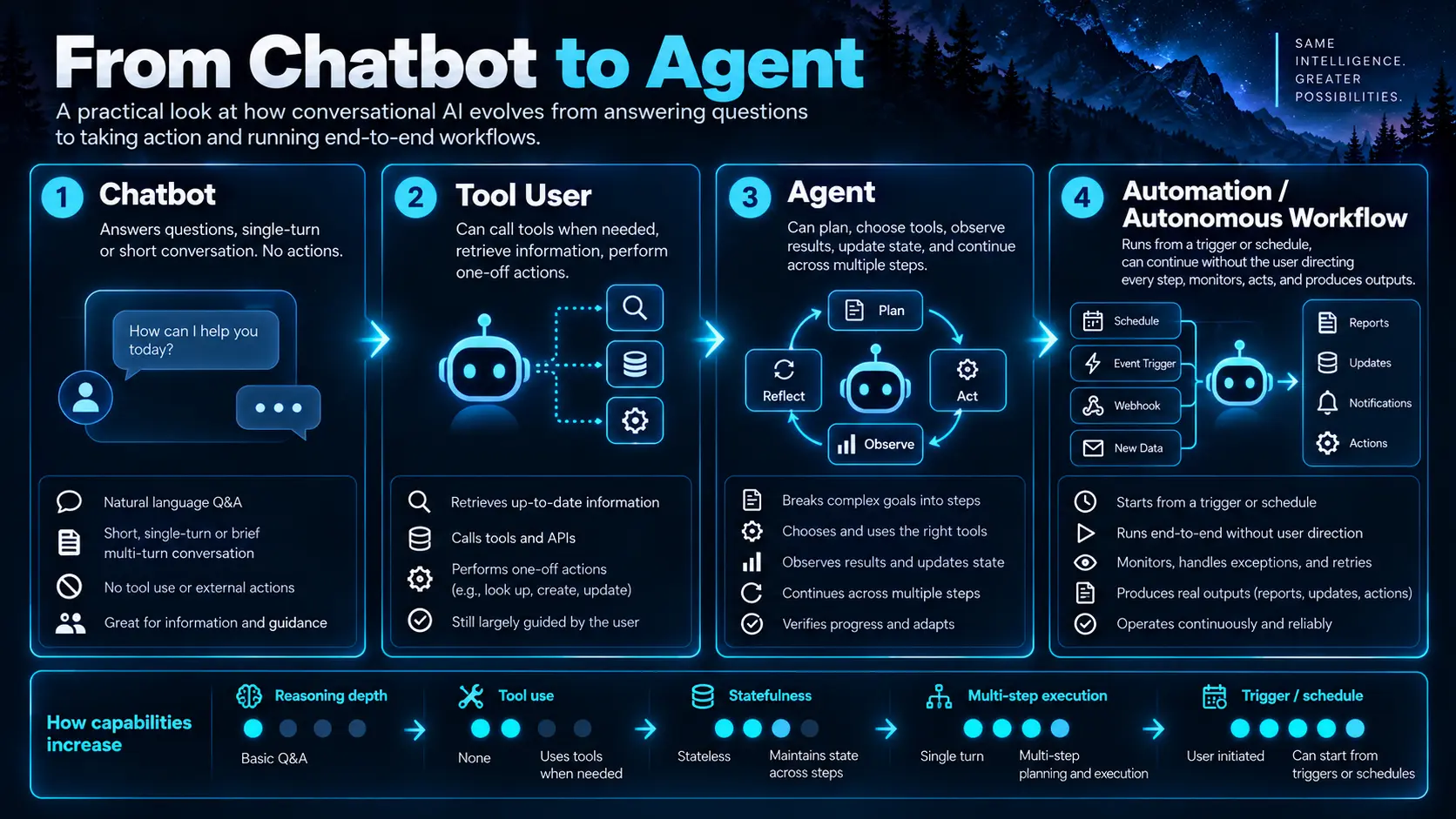
Two searches followed by an answer are already agentic. Editing twenty files and repairing failed tests is more autonomous. A scheduled workflow that begins without a waiting user adds another dimension. Ask four concrete questions: can it choose actions, observe results, preserve state and continue for multiple steps?
02. The spectrum from chatbot to autonomous workflow
 Enlarge illustration ↗
| System | Behaviour |
|---|---|
| Chatbot | Answers from supplied context. |
| Tool-enabled assistant | Can call an external capability. |
| Agentic assistant | Can chain calls and adapt to their results. |
| Agent | Can plan, maintain state and pursue a multi-step goal. |
| Automation | Can start or continue work without a human prompting every step. |
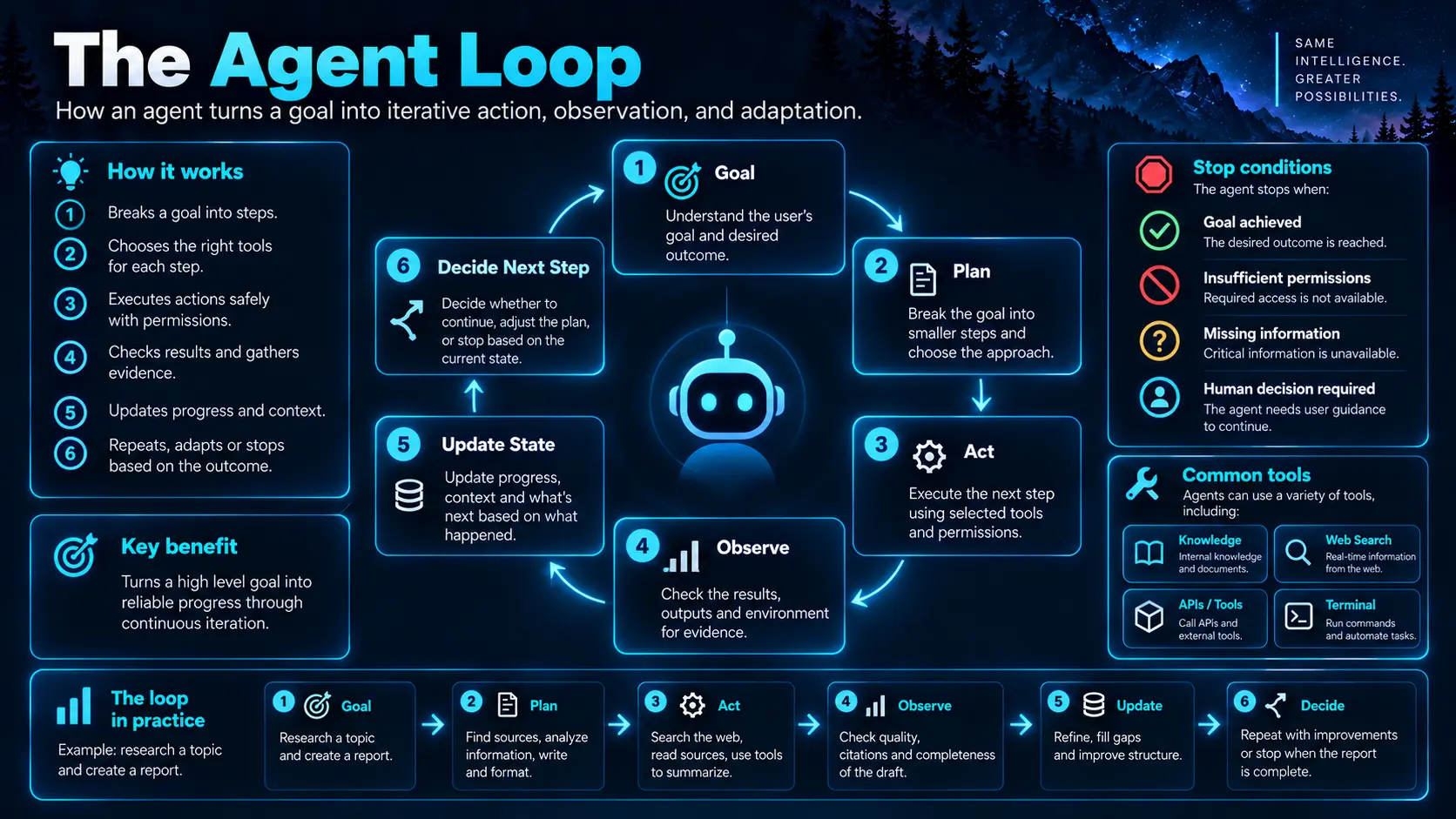
03. The agent loop: goal, plan, act, observe, repeat
 Enlarge illustration ↗
“Investigate the failed deployment, fix it and verify the tests” becomes a sequence: inspect the repository, reproduce the failure, observe the error, locate its cause, edit, rerun checks, revise the hypothesis if necessary and stop only after verification.
state = understand_goal(request)
while not state.done:
    action = model_decides_next_action(state)
    if action is a tool_call:
        result = execute_tool(action)
        state = update_state(state, result)
    else:
        state.final_answer = action.response
        state.done = True
Real systems also enforce schemas, permissions, approvals, retries, budgets and streaming. The key idea remains: an action produces new evidence, and evidence determines the next action.
04. Where the plan lives
- Implicit
- The model selects actions without keeping a formal list. Efficient for a short search-and-answer task.
- Visible
- The model writes a plan in the conversation. Humans can review it, but its states are still prose.
- Structured
- A system tool stores tasks with explicit pending, in-progress, completed or cancelled states.
Long work becomes less reliable when the plan exists only inside transient reasoning. A structured checklist does not make the model smarter; it makes omissions visible and preserves the operational state outside a paragraph.
05. State: how an agent remembers the work
 Enlarge illustration ↗
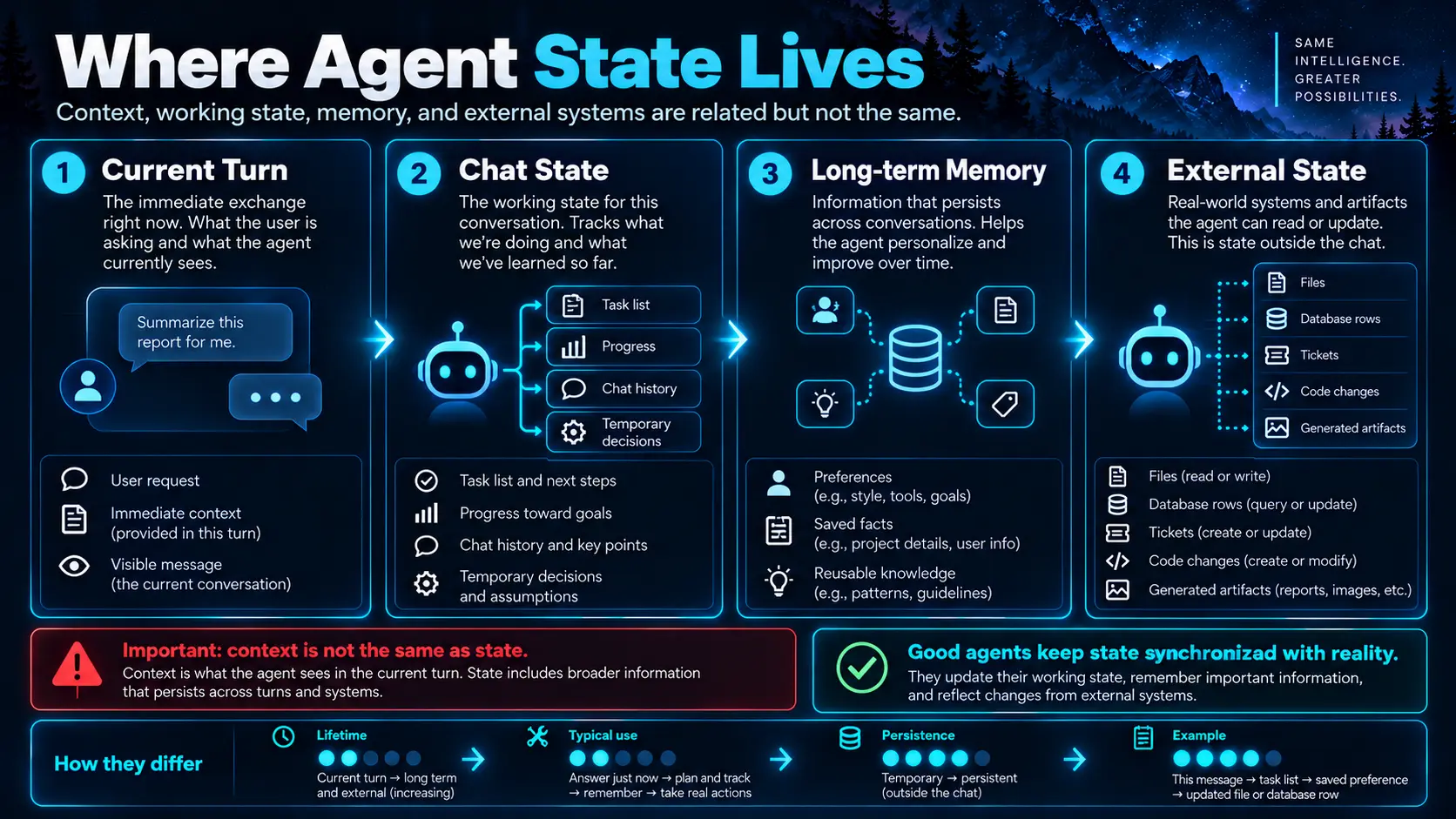
State is information that must survive between steps: inspected tables, a backup created, a failed command and remaining tasks. Some belongs in the chat, some in structured tasks and some in the real system.
State is not context window
State is everything retained by the system. The context window is only what the model can consider during one inference. A long-running agent may have extensive state but must retrieve, summarise and select what enters each prompt.
Choose the source of truth
If the agent created ticket INC123, ServiceNow owns its actual status. “I think it was created” in chat is not authoritative; the agent should query the system again.
06. Chat history, Memory and external state
| Store | Best use | Poor use |
|---|---|---|
| Chat history | Immediate continuity and recent tool results. | An unlimited permanent database. |
| Long-term Memory | Durable preferences and facts across conversations. | Temporary transactional state such as “test 17 is failing now.” |
| External system | Git branches, tickets, database records, files and calendars. | Facts copied into chat and never checked again. |
Open WebUI Memory can add, search, update and delete durable facts through native tool calling. Use it for stable preferences such as a project language or documentation location, while leaving live state in the system that owns it.
07. Native tool calling powers agentic behaviour
 Enlarge illustration ↗
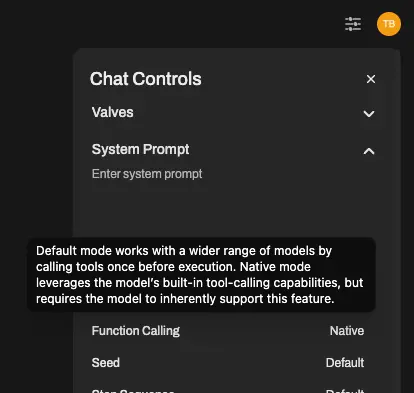
Native mode passes structured Tool schemas to the provider and receives structured calls. Modern built-ins depend on this path; Legacy prompt-parsed calls are not a reliable foundation for agent loops.
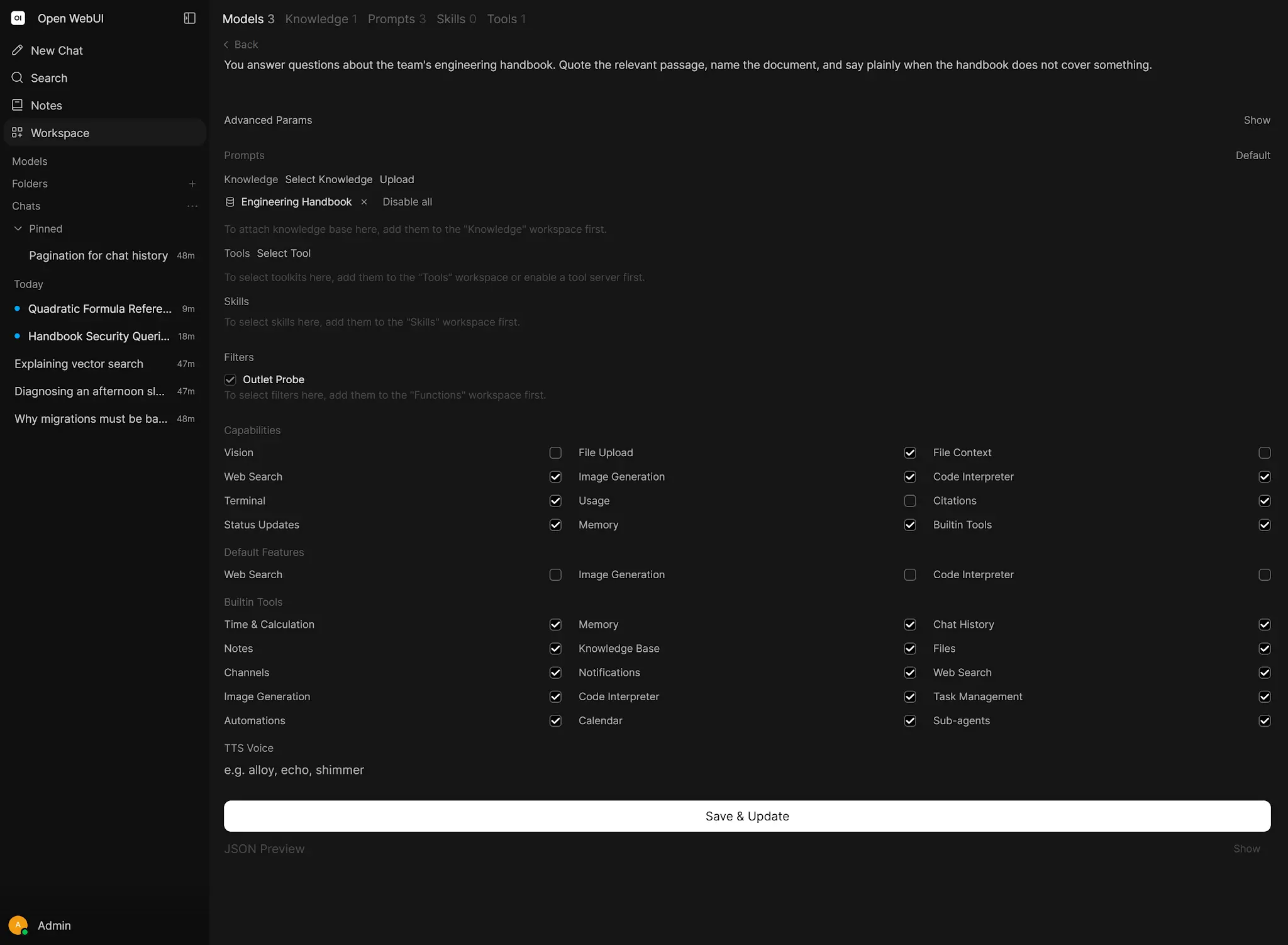
Depending on configuration and access, built-in categories include Memory, Notes, Chat History, Channels, Task Management, Automations, Knowledge, Web Search, Image Generation, Code Interpreter and Sub-agents, alongside Workspace, MCP, OpenAPI and Terminal Tools.
 Enlarge illustration ↗
A model that can call one Tool is not necessarily capable of a ten-step workflow. Planning, result interpretation, error recovery and state maintenance must also hold across the loop.
08. Task Management: visible multi-step progress
create_tasks(tasks=[...])
update_task(id="task-id", status="completed")
Task states are pending, in_progress, completed and cancelled. They are stored with the conversation, so a temporary chat cannot provide the same persistent list.
- Create tasks only for genuinely multi-step work.
- Keep one primary task in progress unless parallelism is intentional.
- Mark completion after verification, not after intention.
- Cancel obsolete work instead of leaving it pending.
- Update the plan when evidence changes it.
The checklist is an operational window into the agent’s state, not decorative status text.
09. Skills, Knowledge and Tools
Skill     = how to work
Knowledge = what to know
Tool      = what it can do
A Skill can teach a code-review method. Knowledge can supply architecture and project conventions. Tools can read GitHub and execute tests. Keeping these roles separate produces a system that is easier to maintain than one enormous prompt that tries to encode method, facts and actions together.
10. Sub-agents and delegation
 Enlarge illustration ↗
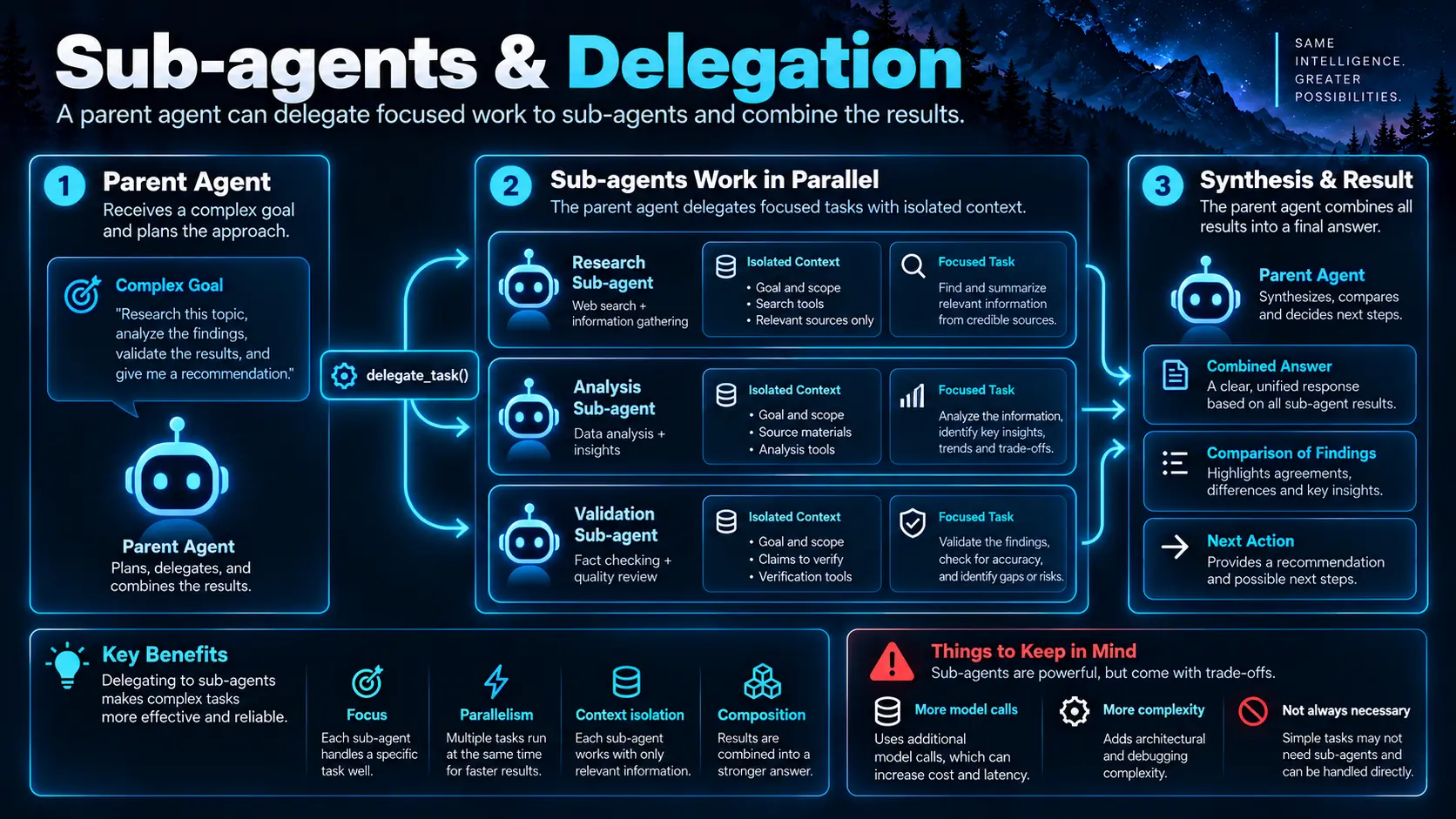
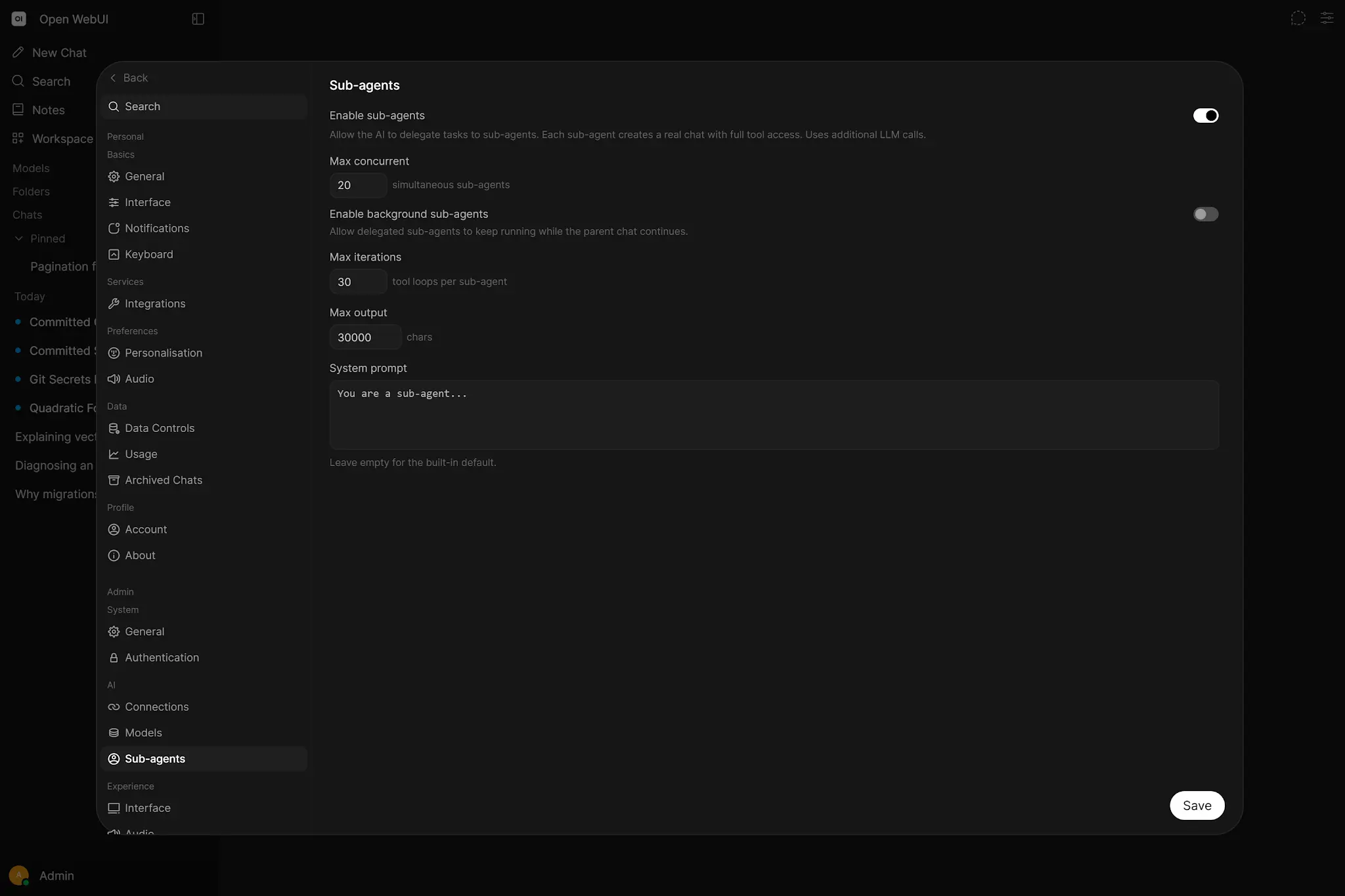
The built-in delegate_task Tool lets a parent give a bounded task to another model execution. The sub-agent works in a separate conversation, using the same model, Tools, Skills and Filters, then returns its final response.
 Enlarge illustration ↗
Delegation helps when
- A smaller, clearer problem improves focus.
- Independent investigations can proceed in parallel.
- Intermediate detail should not pollute the parent context.
- The parent needs to compare specialist results.
It is not free. Every delegation is another full model run and may trigger several calls. If one agent can solve the task clearly, that is usually easier to operate.
11. Open Terminal: a real action workspace
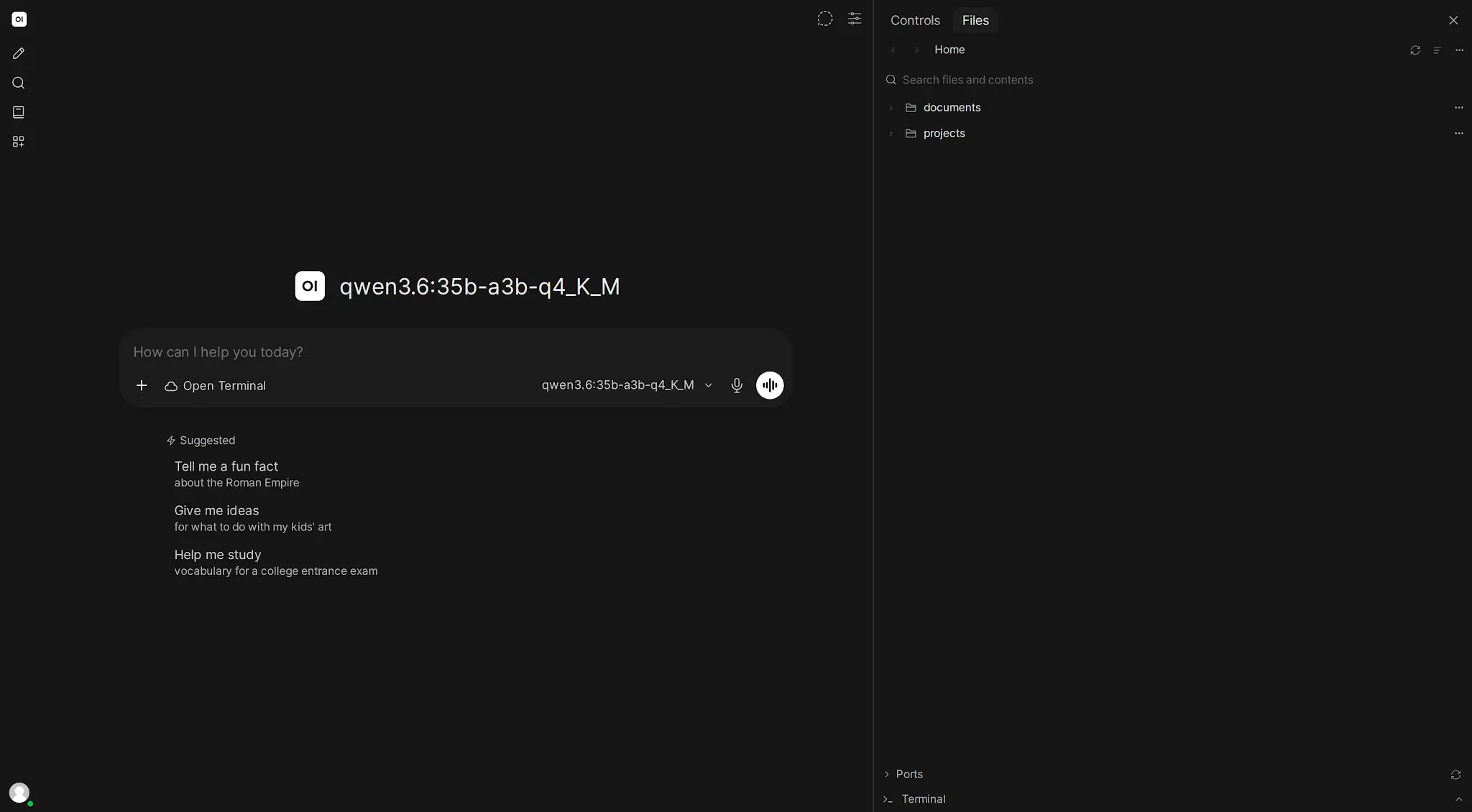 Enlarge illustration ↗
A model without execution can suggest a patch. An agent with Terminal can inspect a repository, edit, run pytest or npm test, read the failure and correct it. Verification closes the feedback loop.
Docker isolation and direct host access are different security decisions. Mount only necessary paths, use development credentials and decide whether persistence is useful enough to justify its larger blast radius.
12. Automations: agentic work without a waiting user
An automation answers “When does work start?” An agent answers “How does the system choose and execute steps?” A schedule may trigger one simple prompt or wake a tool-enabled multi-step workflow.
schedule triggers work + agent loop performs workAutomations belong to their creator and administrators can limit count or frequency. A scheduled task must be safe to run without an interactive person available for clarification or approval.
13. Human approval, guardrails and stop conditions
Experimental Tool Permissions can pause calls for Allow or Deny. Denial returns to the model as an error so it can adapt. This is valuable for sending mail, deleting files, deploying, closing tickets or modifying records.
| Layer | Control |
|---|---|
| Prompt | Describe intent and operating rules. |
| Tool schema | Expose only valid operations and arguments. |
| API/server | Validate identity, values and permissions. |
| Environment | Restrict files, network and credentials. |
| Human approval | Gate costly or irreversible actions. |
| Audit logs | Make actions inspectable afterwards. |
Every loop also needs a success condition and operational limits: maximum retries, timeout, token or Tool-call budget, and user cancellation. “Keep trying until it works” is not a safe policy.
14. Build an agent in Open WebUI
Workspace → Models can wrap a base model with a system prompt, parameters, Knowledge, Tools and Skills. That preset becomes a purpose-built agent without requiring a new framework.
Technical Support Agent
- Choose a model with reliable native tool calling.
- Define scope and escalation in a concise system policy.
- Attach runbooks and architecture as Knowledge.
- Attach a troubleshooting Skill.
- Add read-only ticket, health and log Tools.
- Enable Task Management for longer investigations.
- Test one-Tool cases before multi-step incidents.
- Add narrow writes only after read-only behaviour is reliable.
You are a Technical Support Agent.
Use evidence, not guesses.
Inspect documented and live state.
Plan multi-step investigations visibly.
Prefer read-only tools.
Verify every proposed fix.
Ask before destructive actions.
State what is missing when evidence is insufficient.
15. External agents behind Open WebUI
Open WebUI can also be the frontend for an agent framework exposed through an OpenAI-compatible endpoint. That external system brings its own loop, terminal, memory or session logic while Open WebUI provides users, chat and a shared interface.
A provider returns a completion. An agent endpoint may take many actions before returning. They can look similar in the model picker but have different operational ownership. This pattern fits specialised runtimes, session/resume semantics or capabilities that should not live inside the Open WebUI backend.
16. Evaluate the process, not only the final prose
- Goal completion
- Did the requested outcome actually occur?
- Tool selection
- Did the agent choose the correct capability?
- Arguments
- Were parameters valid, bounded and safe?
- State tracking
- Did it retain completed and pending work?
- Recovery
- Did new evidence change the next step?
- Verification
- Did it prove success rather than assume it?
- Efficiency
- How many model and Tool calls were needed?
- Safety
- Did it remain inside approval and permission boundaries?
Build a benchmark of 10–20 representative tasks and retain Tool calls, unnecessary steps, recovered errors, latency and required human interventions — not only pass/fail.
17. Troubleshooting agent failures
| Failure | Response |
|---|---|
| Never calls Tools | Confirm Native mode; test one trivial Tool with a capable model. |
| Chooses the wrong Tool | Reduce the catalogue and remove overlapping names/descriptions. |
| Bad arguments | Use types, enums and server-side validation. |
| Forgets progress | Use a saved chat, Task Management and less noisy context. |
| Loops | Add success signals, structured errors and retry budgets. |
| Claims success without proof | Add an explicit verification Tool or read-back step. |
| Local model fails long workflows | Reduce complexity or use a stronger orchestration model. |
18. A future local agent stack
- Open WebUI: shared control plane, users, chats and permissions.
- Ollama / remote providers: models chosen by task.
- Workspace Models: specialised assistants.
- Knowledge: long-lived reference material.
- Skills: reusable working methods.
- MCP / OpenAPI: live services and business systems.
- Open Terminal: isolated execution and verification.
- Task Management: visible plans.
- Memory: selected durable preferences.
- Sub-agents: focused delegation when it truly helps.
- Automations: scheduled work with safe unattended behaviour.
The goal is not one magical model. It is a platform where every layer has a clear responsibility.
PRACTICAL CHECKPOINT
Can you trace a complete, bounded agent loop?
- What does the harness add around the LLM?
- Why is observe → decide as important as plan → act?
- Where should task state, durable Memory and real-world state live?
- When does delegation help?
- Which stop and verification conditions prove the work is complete?
Check your answers
The harness supplies Tools, state, execution, permissions and control. Observations update the plan. Tasks belong in chat state, durable preferences in Memory and transactions in their external source. Delegate focused independent work. Stop on verified success or explicit budgets, not on model confidence.
19. Essential vocabulary
- Agent
- A system that pursues a goal through decisions, Tools, state and execution loops.
- Agent harness
- The context, permissions, runtime, feedback and controls around a model.
- Agent loop
- Decide → act → observe → update → repeat.
- State
- Working information preserved between steps.
- Memory
- Durable, retrievable information across conversations.
- Sub-agent
- A focused delegated model execution returning a result to a parent.
- Tool approval
- A human gate before an operation executes.
- Stop condition
- A success or limit criterion that ends the loop.
- Automation
- Scheduled work initiated without a user waiting in the chat.
Source and further reading
This edition preserves the chapter's teaching sequence and examples. Screenshots reflect the source edition; controls may move between releases.
Open the original chapter ↗Workspace Models ↗Task Management ↗Sub-agents ↗Open Terminal ↗