
CHAPTER 14
Security Hardening
Place the platform behind clear, tested protections.
On this page
Faithful English web edition · Original chapter, structure and illustrations from the learning guide.
LEARNING OBJECTIVES
Protect the complete path, not one container
You will define an appropriate threat model, place Open WebUI behind one secure entry point, protect stable secrets, isolate internal services, constrain powerful extensions and design backups that can actually be restored.
01. Start with what needs protection
The assets are broader than the UI: identities and sessions; private chats and uploaded documents; provider and API credentials; models and compute; databases and vector stores; Tools that reach real systems; and backups that contain nearly all of the above.
A control is useful only against a plausible path. Ask who may reach the service, what they could steal or change, and how far a compromised component could move.
| Deployment | Primary exposure | Minimum stance |
|---|---|---|
| Personal LAN-only | Other devices and software on the local network | Authentication, host firewall, stable secrets and backups. |
| Private remote access | VPN or identity-aware access layer | Strong identity, HTTPS, least privilege and monitored access. |
| Internet-facing | Untrusted global traffic | Hardened proxy, patching, rate limits, isolation, monitoring and recovery drills. |
02. One secure deployment path
 Enlarge illustration ↗
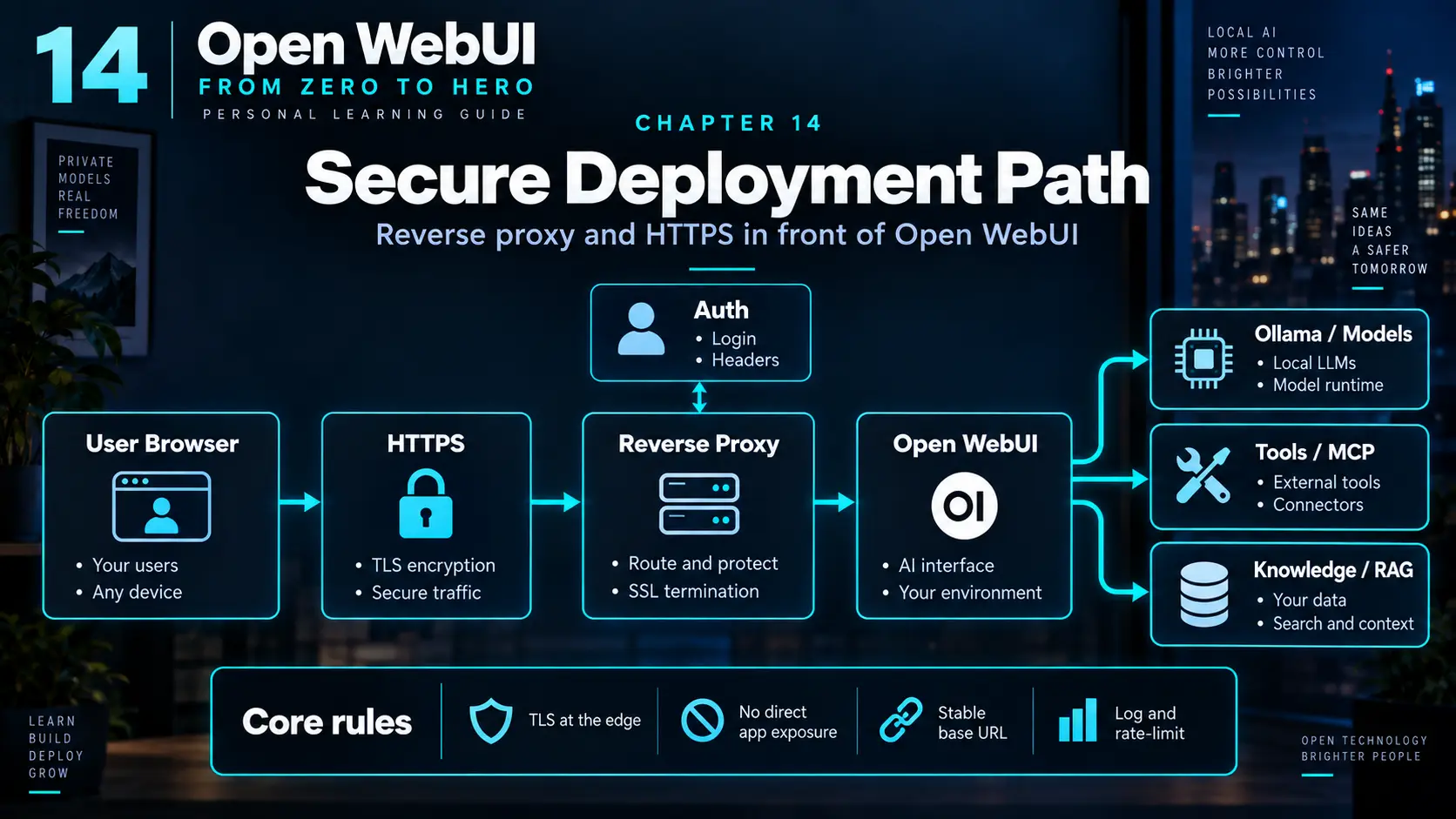
browser → HTTPS reverse proxy → Open WebUI
→ internal model / knowledge servicesThe proxy terminates TLS, applies public request controls and forwards the original scheme and host correctly. The application port should not remain reachable as a second, unprotected entry point.
03. Reverse proxy, HTTPS and browser policy
Minimal Caddy shape
webui.example.com {
    reverse_proxy open-webui:8080
}
Real deployments also need correct DNS, persistent certificate state and network routing. Configure forwarded headers, WebSocket support and timeouts according to the official proxy guide.
WEBUI_URL must name the canonical external URL because OAuth callbacks, links and integrations derive from it. CORS origins should be explicit, secure cookies should be enabled on an HTTPS-only site, and security headers belong at one clearly owned layer.
Test normal navigation, login, OAuth callback, file upload and streamed chat through the public URL. A proxy can serve HTML correctly while buffering or timing out the long-lived response used for generation.
Do not publish both:3000andhttps://webui.example.com. The weaker route becomes the real boundary.
04. Stable secrets and narrow credentials
WEBUI_SECRET_KEY signs sessions and participates in protection of sensitive stored data. Generate a long random value, store it outside source control, keep it stable across container replacement and include it in a protected recovery procedure. Changing it can invalidate sessions and break encrypted integrations.
- Keep Open WebUI API keys tied to the least-privileged account.
- Use backend-only storage; never browser bundles or screenshots.
- Separate provider credentials by environment or service where possible.
- Rotate on exposure and record which integrations depend on each key.
- Redact secrets from logs, prompts, issue trackers and backups shared for support.
05. Network isolation is permission
 Enlarge illustration ↗
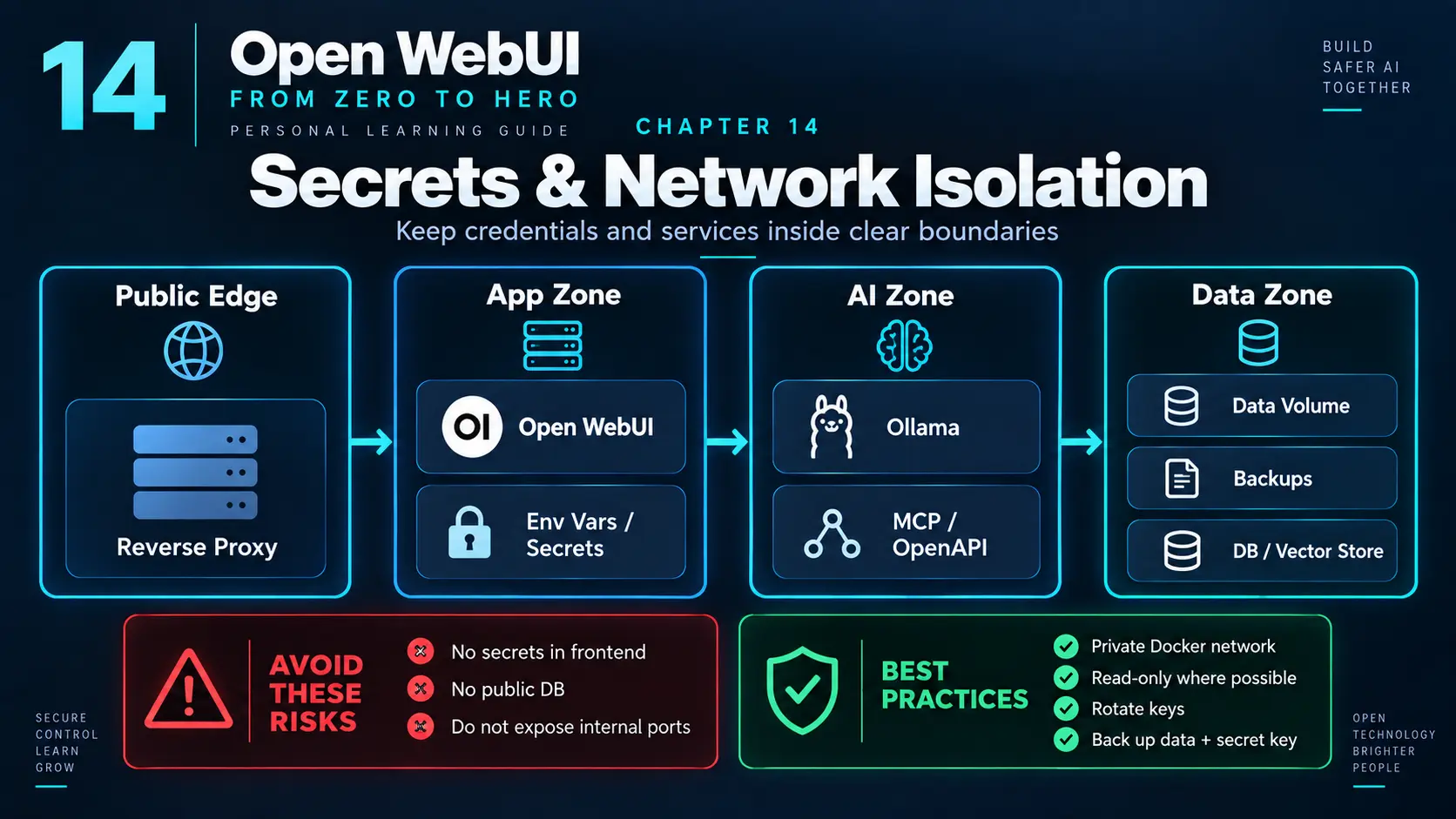
networks:
public:
internal:
internal: true
services:
proxy:
networks: [public]
open-webui:
networks: [public, internal]
ollama:
networks: [internal]
postgres:
networks: [internal]Do not publish the database or Ollama merely because Docker makes it easy. A host mount grants access to its real contents. The Docker socket can amount to host-level control; do not mount it into an application without a deliberately designed proxy and threat model.
Network isolation is not complete authorisation. A compromised application already attached to the internal network can reach peers. Combine routes with service authentication, narrow database roles and secrets that are not shared by every container.
06. Authentication, signup and RBAC
Disable public signup unless enrollment is intentional. Enforce a password policy or use a carefully configured SSO provider. Treat group and role permissions as additive: adding a broad group may widen access even when another group looks restrictive.
Keep authentication bypasses disabled unless a trusted upstream identity layer has been fully designed and tested. “Behind the proxy” is not the same as “authenticated.”
Test effective access with representative non-admin accounts. Administration screens describe configured policy; the user’s model picker, Knowledge search and Tool list reveal the result. Record why each privileged group exists and remove stale memberships.
07. Tools are separate trust boundaries
Workspace Tools and Functions execute code in the Open WebUI environment. MCP and OpenAPI services carry their own network reach, credentials and schemas. Open Terminal deliberately grants filesystem and command execution. Review each as an independent privileged service.
| Capability | Primary risk | Boundary |
|---|---|---|
| Tool / Function | Arbitrary server-side logic | Trusted code, restricted users, explicit secrets. |
| MCP / OpenAPI | Remote calls with service authority | Narrow token, network allowlist, schema validation. |
| Open Terminal | Filesystem and shell access | Dedicated workspace, isolation, approval policy. |
Model judgment is not authorisation. Validate arguments and enforce permission at the service receiving the action.
08. Databases, storage and encryption at rest
SQLite is reasonable for a small single-instance deployment when its volume and backup procedure are understood. PostgreSQL is a better fit for multi-instance operation and external database lifecycle. Neither choice encrypts every underlying disk, snapshot or backup automatically.
Use storage-layer encryption where confidentiality requires it, and protect encryption keys separately from the encrypted data. Encrypt backups too; a perfectly protected live system with a public backup archive is still a breach.
Retention is also a control. Decide how long chats, uploads, logs and exports remain necessary, then remove them through an auditable process. Keeping every copy forever increases impact without improving recovery.
09. Outbound traffic, SSRF and offline operation
Open WebUI may fetch URLs, call providers, contact Tools or reach model services. An attacker who influences a server-side URL can attempt server-side request forgery against internal metadata, administration endpoints or private hosts.
- Allow only required outbound destinations where practical.
- Keep sensitive admin services on separate networks.
- Do not trust a URL merely because the browser could not reach it.
- For offline or air-gapped systems, pre-stage images, models and dependencies and disable features that expect public network access.
10. Backups must include a tested restore
Stop or quiesce SQLite before copying it; a live file copy can be inconsistent. Back up the database, Open WebUI data volume, uploaded documents, vector-store state where required, proxy configuration and the secrets needed to decrypt restored integrations.
Restore into an isolated test deployment. Confirm authentication, chat access, Knowledge retrieval, model connections and one protected integration. Record recovery time and every missing dependency.
Define recovery point and recovery time targets in plain language: how much recent work may be lost, and how long the service may remain unavailable. Those targets determine backup frequency, storage location and whether a manual restore is sufficient.
11. Patch and observe the whole stack
Open WebUI, reverse proxy, container runtime, database, model runtime, tool servers and host OS all participate in the boundary. Update with release review, a backup and a rollback path.
Keep enough logs to investigate authentication failures, permission changes, API use, tool execution and unusual error rates without recording secrets or entire private prompts by default. Monitor disk, memory, GPU pressure, container restarts and availability.
Assign an owner and response for each alert. Monitoring without a threshold, escalation route or action is a dashboard, not an operational control.
12. A practical hardened homelab
 Enlarge illustration ↗
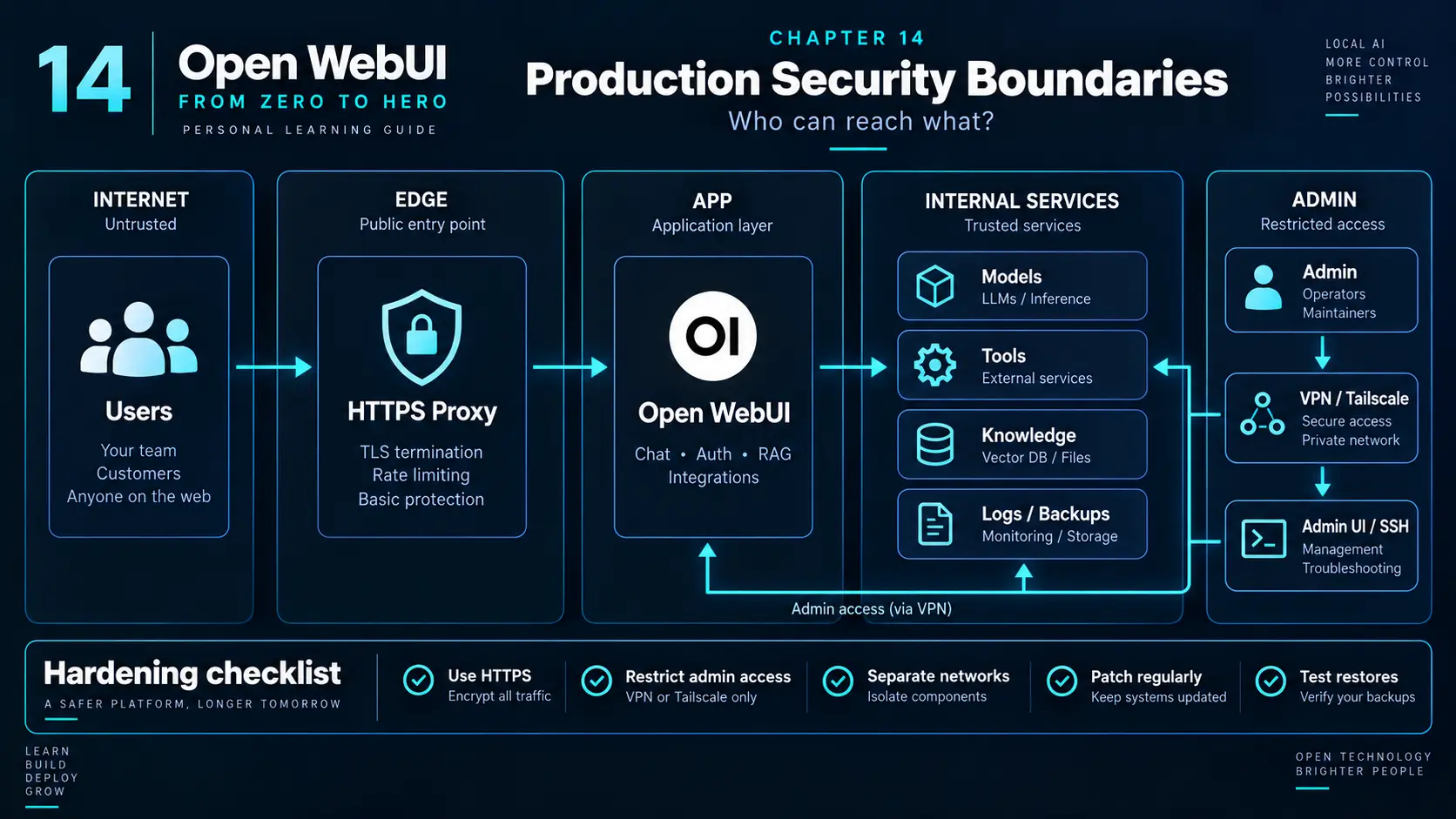
- A single HTTPS proxy is the only public entry point.
- Open WebUI is reachable only by the proxy and approved administrators.
- Ollama, database and vector services have no public ports.
- Provider keys and
WEBUI_SECRET_KEYcome from protected configuration. - Tools receive separate credentials and only the networks they need.
- Backups are encrypted, versioned and restored on a schedule.
- Logs and resource metrics have an owner and retention policy.
13. Production boundary checklist
 Enlarge illustration ↗
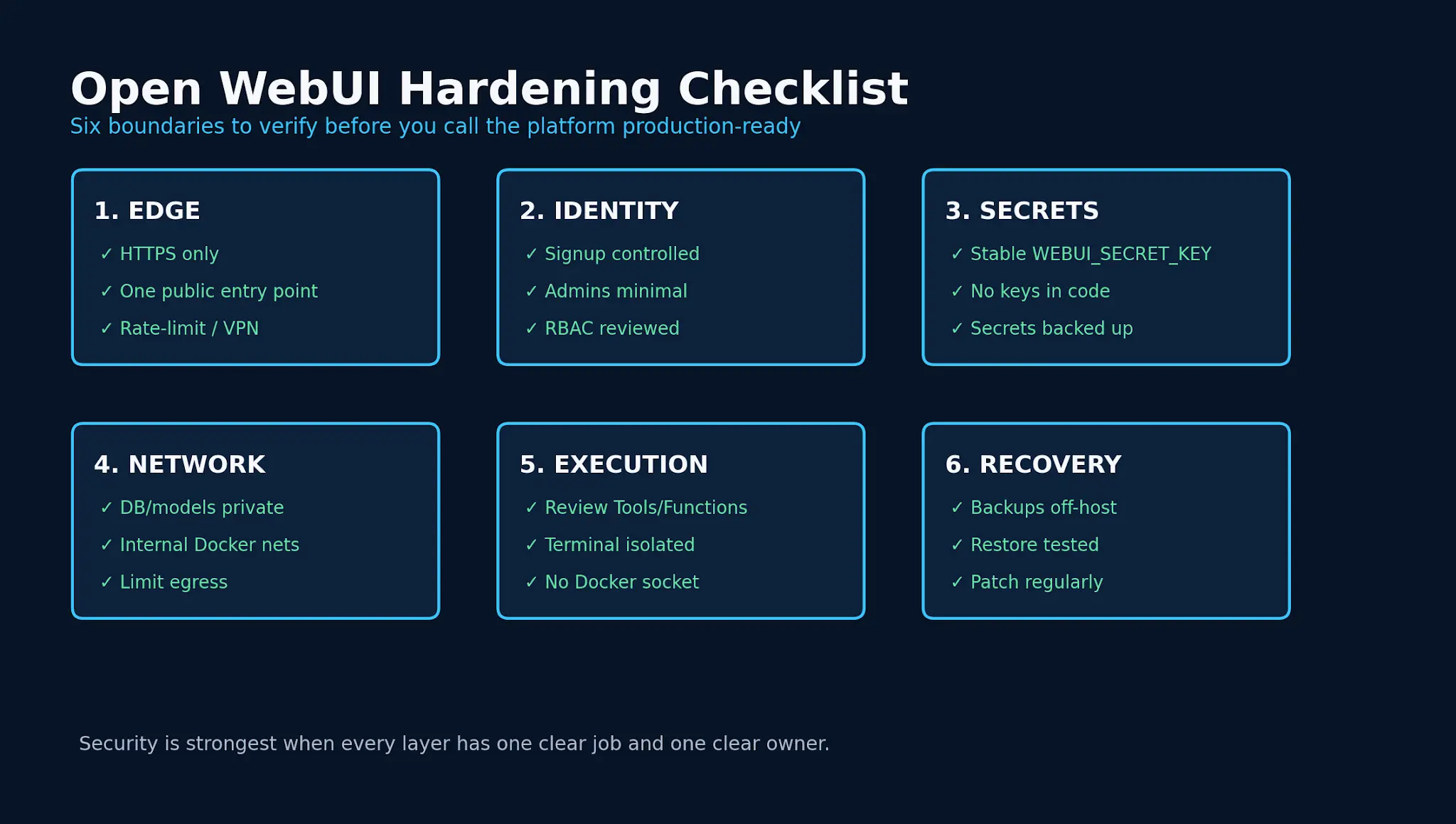
- Public ports and DNS are enumerated.
- HTTPS redirects and direct-port blocking are tested.
WEBUI_URL, allowed origins and secure cookies match the public origin.- Signup and RBAC match the intended audience.
- Secrets are stable, private, rotated and recoverable.
- Internal services have no accidental public route.
- Tool, MCP and Terminal authority is documented.
- Outbound reach is understood.
- Backup and isolated restore both succeed.
- Patching, monitoring and incident ownership are defined.
14. Troubleshooting security configuration
| Symptom | Likely boundary |
|---|---|
| UI loads but streaming fails | Proxy WebSocket/SSE forwarding or timeout. |
| OAuth redirects to localhost | Incorrect public URL or forwarded headers. |
| Sessions vanish after recreation | Unstable application secret. |
| HTTPS works but port 3000 remains open | Host port still published. |
| Tool reaches forbidden internal service | Network and egress rules are too broad. |
| Restored OAuth integration breaks | Secret used for protected data differs from backup era. |
15. Practical checkpoint
- Draw every public and internal route.
- List where sessions, chats, files, keys and backups live.
- Remove one unnecessary port, mount or credential.
- Test direct HTTP access, failed login logging and one least-privilege user.
- Restore a backup into an isolated target.
16. Essential vocabulary
- TLS termination
- The point where encrypted browser traffic is decrypted and verified.
- Reverse proxy
- The public server forwarding requests to a private application.
- Least privilege
- Granting only the authority necessary for the job.
- Blast radius
- The maximum data or systems affected by a compromise.
- SSRF
- Inducing a server to request an internal or sensitive destination.
- Egress
- Traffic leaving a service or network.
- Encryption at rest
- Protection of stored data on disk, database or backup media.
Source and further reading
This edition preserves the chapter's teaching sequence and examples. Screenshots reflect the source edition; controls may move between releases.
Open the original chapter ↗Hardening ↗HTTPS and proxies ↗Authentication ↗RBAC ↗Open Terminal security ↗