CHAPTER 02
Installing Open WebUI Properly
Build a home for your AI that you can update and recover.
On this page
Faithful English web edition · Original chapter, structure and illustrations from the learning guide.
LEARNING OBJECTIVES
Install a system you can explain and recover
After this chapter you should understand every important Docker flag, where the data lives, how Open WebUI reaches Ollama, what can safely be replaced, how to update and what must be protected before remote exposure.
01. Why Docker is the default path
Open WebUI can run through Docker, Python, Kubernetes, Podman and other methods. Docker is this guide's default because it packages the application and dependencies into a reproducible, replaceable unit. Docker Compose becomes the maintainable baseline because it records that unit as reviewable configuration.
Docker does not merely install files. It runs Open WebUI inside a replaceable container. Important state must outlive that container.
Python or uv remains useful for development; Kubernetes makes sense when orchestration and scale justify it; Podman is strong in RHEL and Fedora environments. Learn one path deeply before multiplying choices.
02. Containers are temporary; data must persist
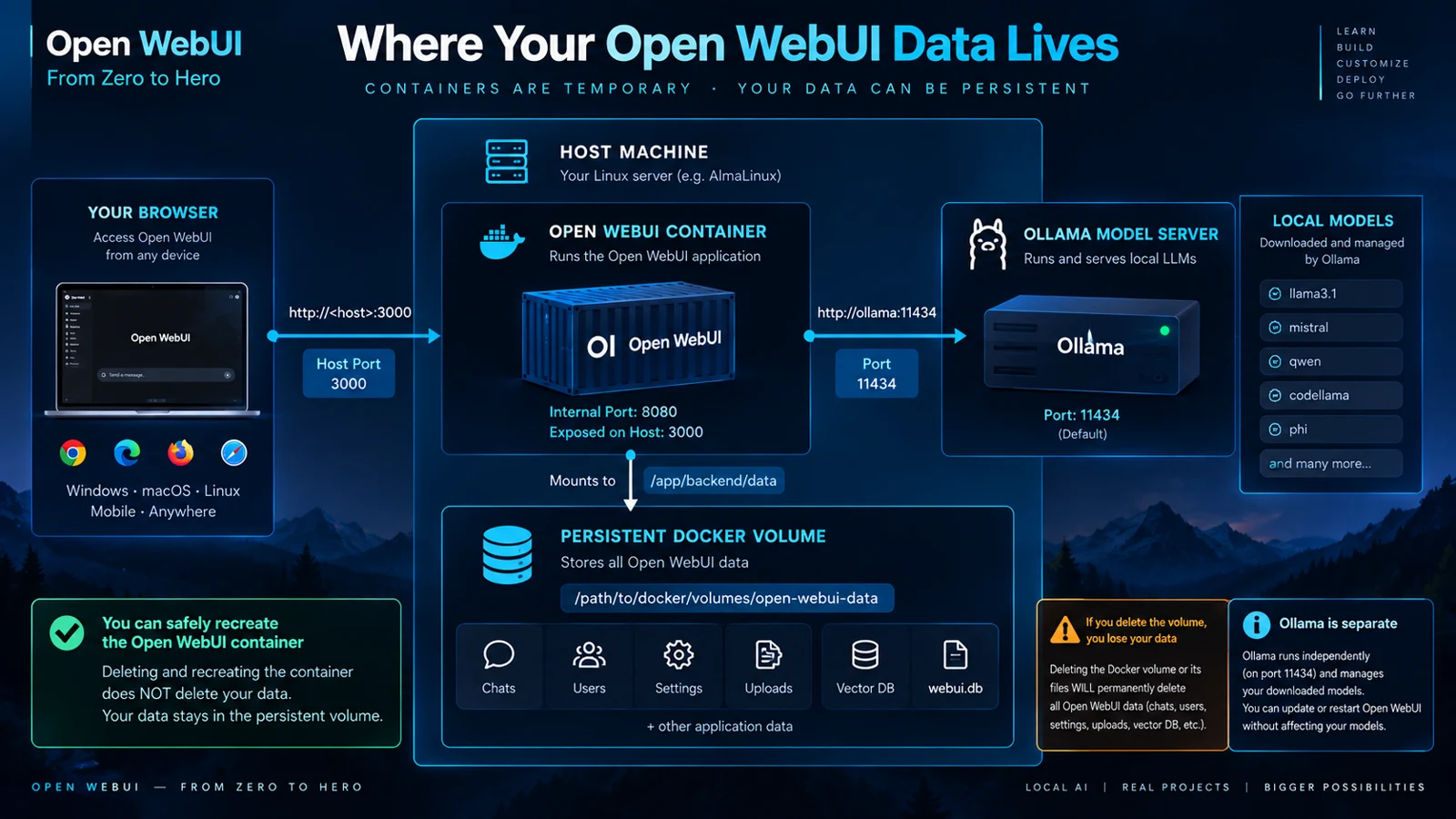
A container can stop, disappear and be recreated without becoming a disaster. The application image is replaceable; your users, chats, settings and uploads are not.
 Enlarge illustration ↗
Open WebUI stores application data at /app/backend/data. A named volume mounted there can include the database, uploads, vector data, caches and audit information. The exact files may evolve, but the directory must be treated as protected application state.
Ollama's model files and configuration are separate when it runs as its own service. Updating Open WebUI should not destroy Ollama's storage.
03. The canonical Docker setup
The official pattern publishes the application port, maps persistent storage, creates a stable host route, keeps a fixed secret and assigns a restart policy.
# Generate once and keep it safe
openssl rand -hex 32

docker run -d \
  -p 3000:8080 \
  --add-host=host.docker.internal:host-gateway \
  -v open-webui:/app/backend/data \
  -e WEBUI_SECRET_KEY="replace-with-your-secret" \
  --name open-webui \
  --restart always \
ghcr.io/open-webui/open-webui:main| Flag | Meaning |
|---|---|
-d | Run in the background. |
-p 3000:8080 | Publish container port 8080 on host port 3000. |
--add-host | Let the Linux container resolve the host gateway. |
-v | Mount durable storage at the application data path. |
WEBUI_SECRET_KEY | Keep cryptographic identity stable across recreations. |
--restart | Bring the service back after host restarts. |
If the secret changes during recreation, existing sessions can be invalidated.
04. Docker Compose: the maintainable baseline
docker run teaches the moving parts. Compose records them in a file another person can review and repeat. Keep variable or sensitive values in a local .env file.
open-webui/
├── docker-compose.yml
├── .env
└── backups/
.env
OPEN_WEBUI_PORT=3000
OPEN_WEBUI_TAG=main
WEBUI_SECRET_KEY=replace-with-the-generated-value
docker-compose.yml
services:
  open-webui:
    image: ghcr.io/open-webui/open-webui:${OPEN_WEBUI_TAG}
    container_name: open-webui
    ports:
      - "${OPEN_WEBUI_PORT}:8080"
    volumes:
      - open-webui:/app/backend/data
    extra_hosts:
      - "host.docker.internal:host-gateway"
    environment:
      WEBUI_SECRET_KEY: "${WEBUI_SECRET_KEY}"
    restart: unless-stopped

volumes:
  open-webui:
docker compose up -d
docker compose ps
docker compose logs -f open-webuiLearn to read service status, logs and volume inspection. A server you can only start is fragile; a server you can observe is maintainable.
05. Connecting Open WebUI to Ollama
Ollama commonly exposes its API on port 11434. Open WebUI calls that API; it does not contain the model.
Ollama on the same host
Inside the container, localhost refers to the container itself. With the host-gateway mapping, Open WebUI can reach host Ollama at http://host.docker.internal:11434.
Browser → host:3000 → Open WebUI container
→ host.docker.internal:11434 → Ollama
Ollama on another machine
Use the real LAN address or DNS name, ensure Ollama listens on an accessible interface and permit traffic in the firewall only from the required source.
An administrator manages the connection in Settings → Admin → Connections. A sound design lets Ollama move to another host by changing this URL, without reinstalling the interface.
06. Ports, hostnames and Docker networking
Interpret an address from the viewpoint of the process making the request.
- Browser
- Uses the server address and published host port, such as
http://server:3000. - Container
- Its own
localhostpoints back to itself. - Host gateway
host.docker.internalreaches a host service when explicitly configured.- Remote Ollama
- Uses the remote machine's IP or DNS and port 11434.
3000:8080 means host port : container port. Changing it to 8088:8080 changes the browser address without changing Open WebUI's internal port.
docker compose ps
docker compose logs --tail=100 open-webui
curl http://localhost:11434/api/tags
docker exec -it open-webui sh07. Image variants and GPU misunderstandings
- :main
- The normal release line. Convenient for a homelab when you choose when to pull updates.
- :cuda
- GPU support for components running inside the Open WebUI container. It is not required for a separate Ollama service to use its GPU.
- Bundled Ollama
- Maximum convenience in one image, with tighter lifecycles. This guide keeps services separate.
- :dev
- Pre-release code. Use a different container, port and volume; never share the production volume.
The model runtime owns inference. Giving a GPU to the interface container does not accelerate an external Ollama process.
08. First boot and the administrator account
The first account created becomes the administrator and is stored in the persistent volume. New-registration behaviour can later be controlled under Settings → Admin → Authentication.
Recreating a container while mounting the same volume does not reset the application. A true reset changes or removes the persistent data, which is a destructive operation.
09. Logs and basic troubleshooting
docker compose logs -f open-webui
docker compose logs --tail=100 open-webui
docker compose ps
docker inspect open-webui
Port already in use
Change the host side of the mapping, such as 3001:8080.
The model list is empty
The interface is running, so inspect provider configuration, the Ollama URL and whether port 11434 is reachable from the container.
The browser looks broken after an update
Perform a hard refresh to eliminate stale frontend assets before changing server configuration.
10. Backups: protect state, not the image
The container image can be downloaded again. Users, chats, settings, uploads and databases cannot. Inspect the volume and copy it consistently.
docker volume inspect open-webui

mkdir -p backups
docker compose stop open-webui

docker run --rm \
  -v open-webui:/source:ro \
  -v "$PWD/backups:/backup" \
  alpine \
  sh -c 'tar -czf /backup/open-webui-backup.tar.gz -C /source .'

docker compose start open-webuiLarge Ollama models can often be downloaded again. Back up custom Modelfiles and any artefact you cannot reproduce.
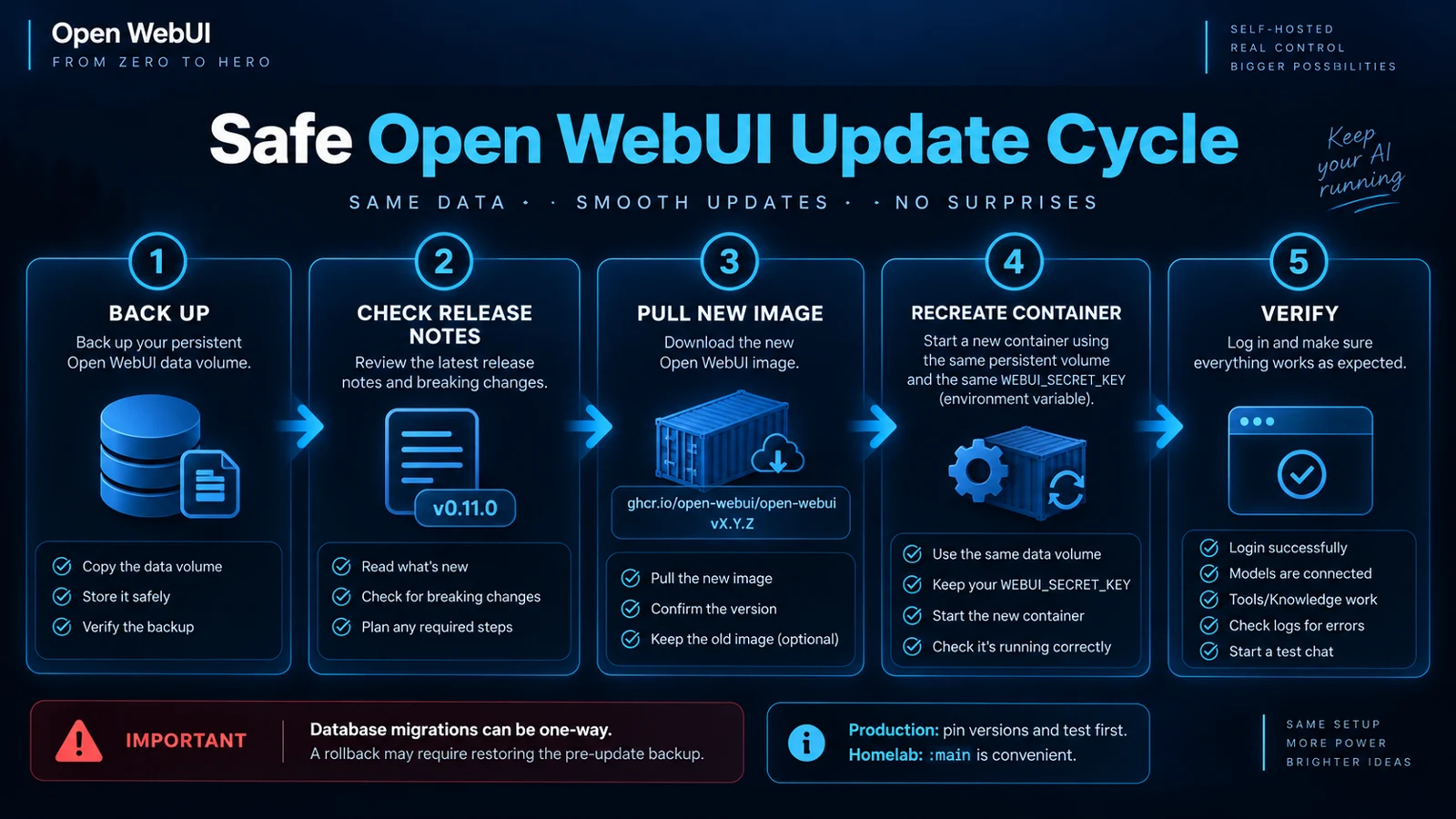
11. Updating safely
 Enlarge illustration ↗
docker compose pull
docker compose up -d
docker compose logs --tail=100 open-webuiFor a personal homelab, a moving release tag is convenient. For a shared or critical instance, pin a version, read release notes and test before production.
image: ghcr.io/open-webui/open-webui:v0.11.312. HTTPS and reverse proxies
HTTP can be acceptable on localhost or a controlled LAN. Outside that boundary, HTTPS protects credentials, chats and files in transit and enables browser APIs that require a secure context.
- WEBUI_URL
- The real public URL of the instance.
- CORS origins
- Allow the exact browser origins that need access.
- WebSockets
- The proxy must preserve upgrade headers.
- Streaming
- Avoid proxy buffering that hides incremental responses.
- Timeouts
- Long inference may legitimately take minutes.
Opening port 3000 directly to the Internet is not a production design. TLS, authentication, CORS, firewall rules and controlled updates form one security surface.
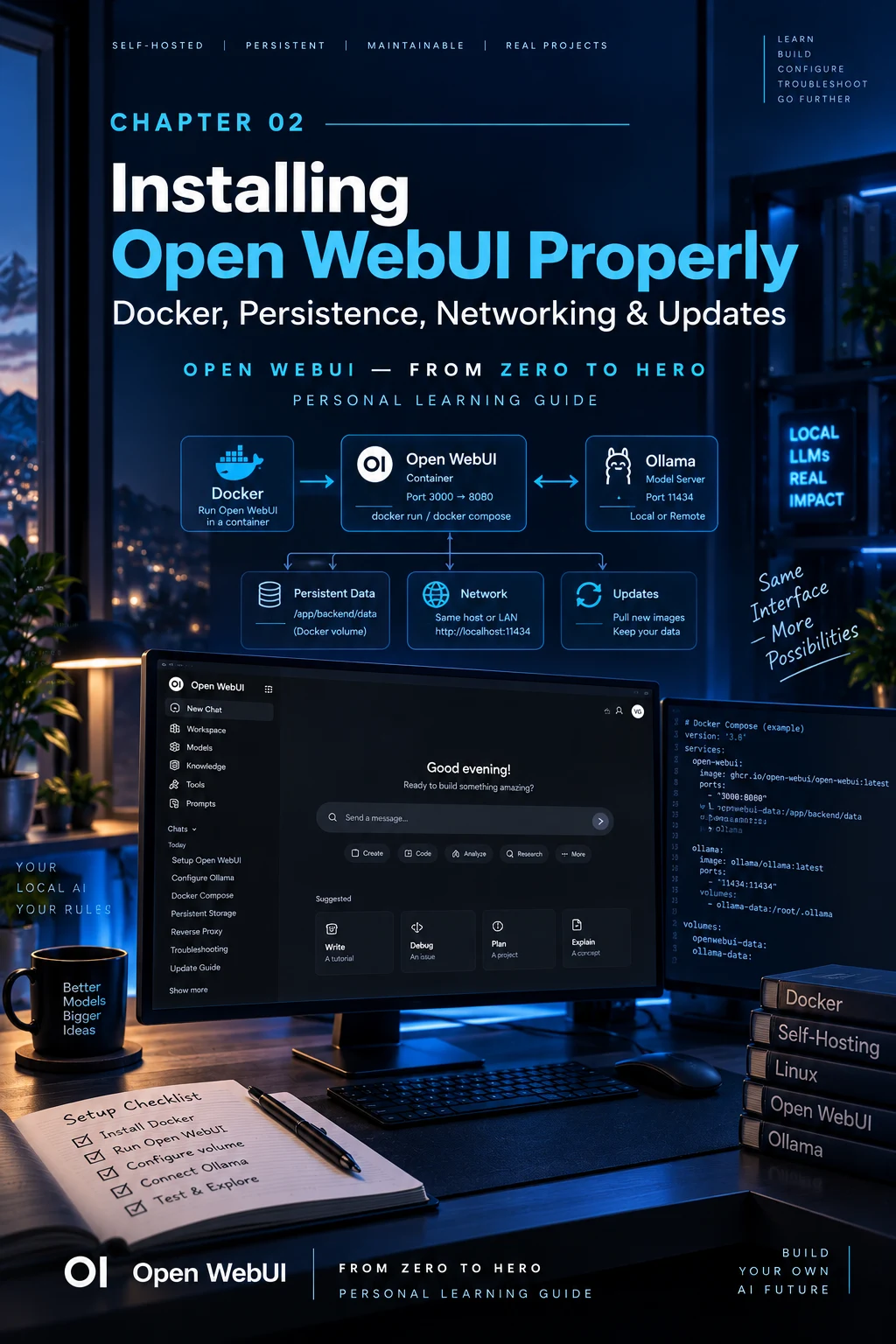
13. The deployment standard used in this guide
 Enlarge illustration ↗
- Open WebUI runs through Docker Compose.
/app/backend/datauses persistent, backed-up storage.WEBUI_SECRET_KEYremains stable.- Ollama runs as an independent service.
- The Ollama connection uses an explicit URL.
- Updates are controlled and preceded by a backup when migrations matter.
This is small enough for a homelab and still teaches principles that survive PostgreSQL, Redis, reverse proxies, multiple users and several model servers.
PRACTICAL CHECKPOINT
Can you recover the installation?
- What is the difference between deleting a container and deleting its volume?
- Why must
/app/backend/datapersist? - What does
3000:8080mean? - Why is container
localhostnot the Linux host? - Does Open WebUI need its CUDA image for an external Ollama to use the GPU?
- Why can a rollback need a backup, not only an older image?
14. Essential vocabulary
- Container
- A running, replaceable instance of an image.
- Image
- The immutable template used to create containers.
- Volume
- Persistent storage managed by Docker.
- Bind mount
- A specific host directory mounted into a container.
- Port mapping
- The relationship between a host port and a container port.
- Secret key
- A stable application secret that must survive recreation.
- Reverse proxy
- A front service that routes traffic and commonly adds HTTPS.
- Pinned version
- A fixed image tag that makes deployment reproducible.
Source and further reading
This edition preserves the chapter's teaching sequence and examples. Screenshots reflect the source edition; controls may move between releases.
Open the original chapter ↗Open WebUI Quick Start ↗Updating Open WebUI ↗