CHAPTER 06
Knowledge & RAG from Zero
Build a trustworthy path from documents to grounded answers.
On this page
Faithful English web edition · Original chapter, structure and illustrations from the learning guide.
LEARNING OBJECTIVES
Trace a document from upload to grounded answer
By the end, you should be able to explain the complete path — file, extracted text, chunks, embeddings, vector database, retrieval, context and answer — and identify whether a failure belongs to extraction, chunking, indexing, retrieval, context or the model itself.
01. What problem RAG solves
A language model does not automatically know your documents. If you write a 200-page internal procedure tomorrow, downloading a model today does not put that procedure into its weights. You could paste all 200 pages into every prompt, but that only works while the document is small enough, the context window is large enough and repeated input is affordable.
Retrieval-Augmented Generation solves a narrower problem: retrieve the most relevant external evidence just before the model answers, then place that evidence in its context.
Without RAG: question → model → answer from existing context
With RAG: question → retrieve evidence → add context → model → grounded answer02. What happens when you upload a PDF
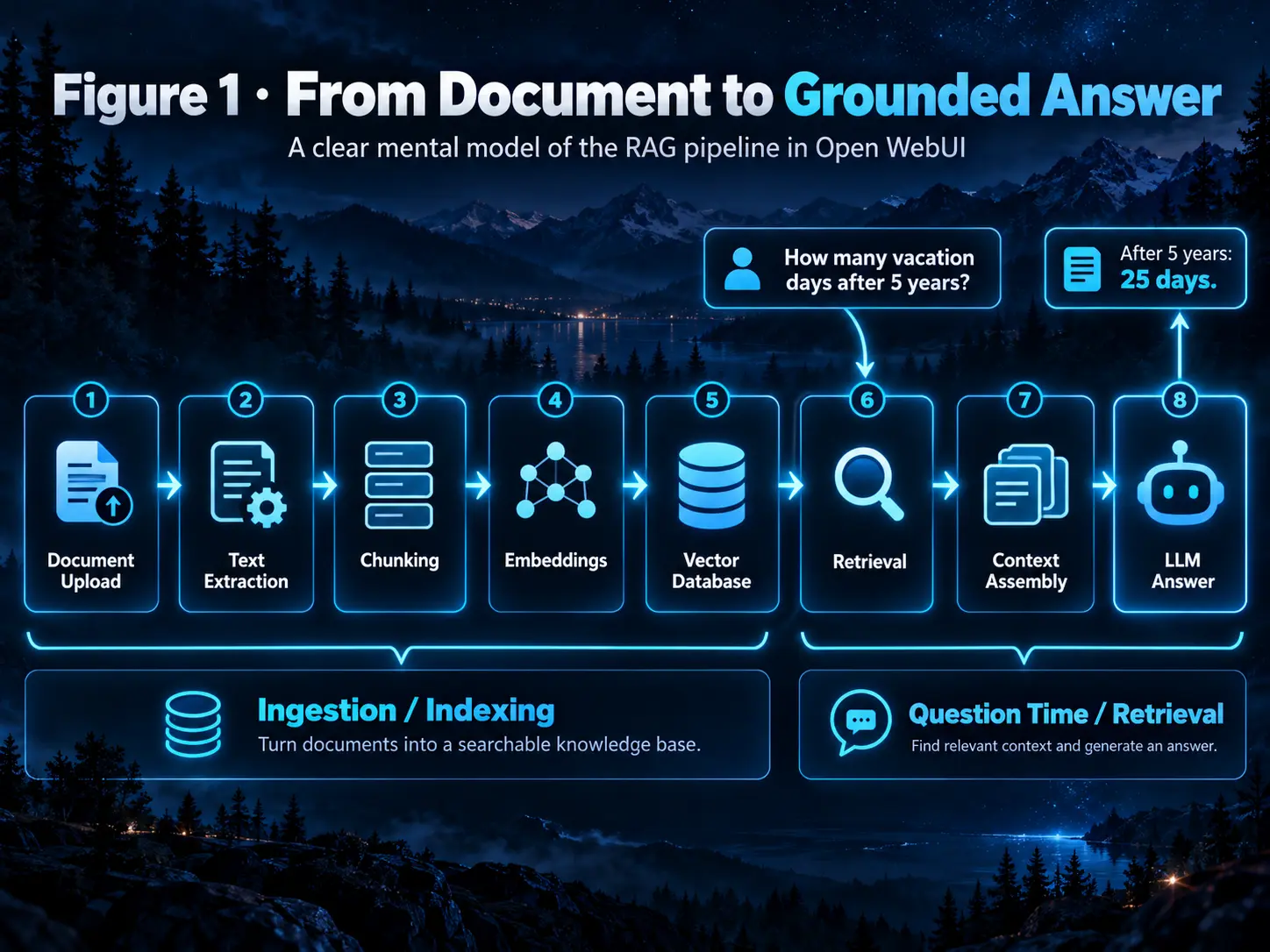
Suppose you upload Employee_Handbook.pdf and later ask, “How many vacation days do I receive after five years?” Two different moments are involved.
 Enlarge illustration ↗
Ingestion
- Open WebUI receives and stores the file.
- An extractor turns PDF, DOCX, HTML or image content into usable text.
- The text is divided into chunks.
- An embedding model converts every chunk into a numeric vector.
- The vector, original chunk text and metadata are stored in the vector index.
Query time
- The question is represented for search.
- Vector search — and optionally BM25 — retrieves candidates.
- An optional reranker orders those candidates again.
- The best chunks enter the model context or are opened through Knowledge tools.
- The chat model writes the final answer from that evidence.
The vector database does not write the answer, and the embedding model does not chat. Each component has one job.
03. Document extraction comes before retrieval
The first RAG problem is not mathematical. It is whether Open WebUI read the document correctly. A PDF may contain digital text, scans, columns, repeated headers, diagrams and tables whose layout carries meaning.
Parsing versus OCR
Parsing extracts text and structure already encoded in a file. OCR recognises characters inside images. A scanned PDF may look perfect on screen while containing almost no extractable text until an OCR engine processes it.
The default extractor may be enough for casual use. Frequent ingestion, complex layouts or production workloads may justify Tika, Docling, Mistral OCR or another external extractor. If extraction changes, re-upload the original file; reindexing alone does not parse it again.
04. Chunking: where useful meaning begins and ends
A hundred-page manual becomes one long text stream after extraction. Chunking decides which pieces should be independently searchable and reusable.
- Chunk size
- Too small loses relationships; too large retrieves noise and spends context on irrelevant text.
- Overlap
- Repeats a small boundary between adjacent chunks so an idea is less likely to be split in half.
- Character splitter
- Measures length using characters.
- Token splitter
- Relates chunk size more directly to the model’s context budget.
- Markdown headers
- Uses human-authored headings as semantic boundaries before normal splitting.
Overlap is insurance, not free context. Too much creates duplicate vectors and near-identical candidates. Header splitting is valuable for structured manuals, but tiny subsections may need a minimum-size target so a title and one sentence are merged with useful neighbours.
05. Embeddings: meaning expressed as coordinates
 Enlarge illustration ↗
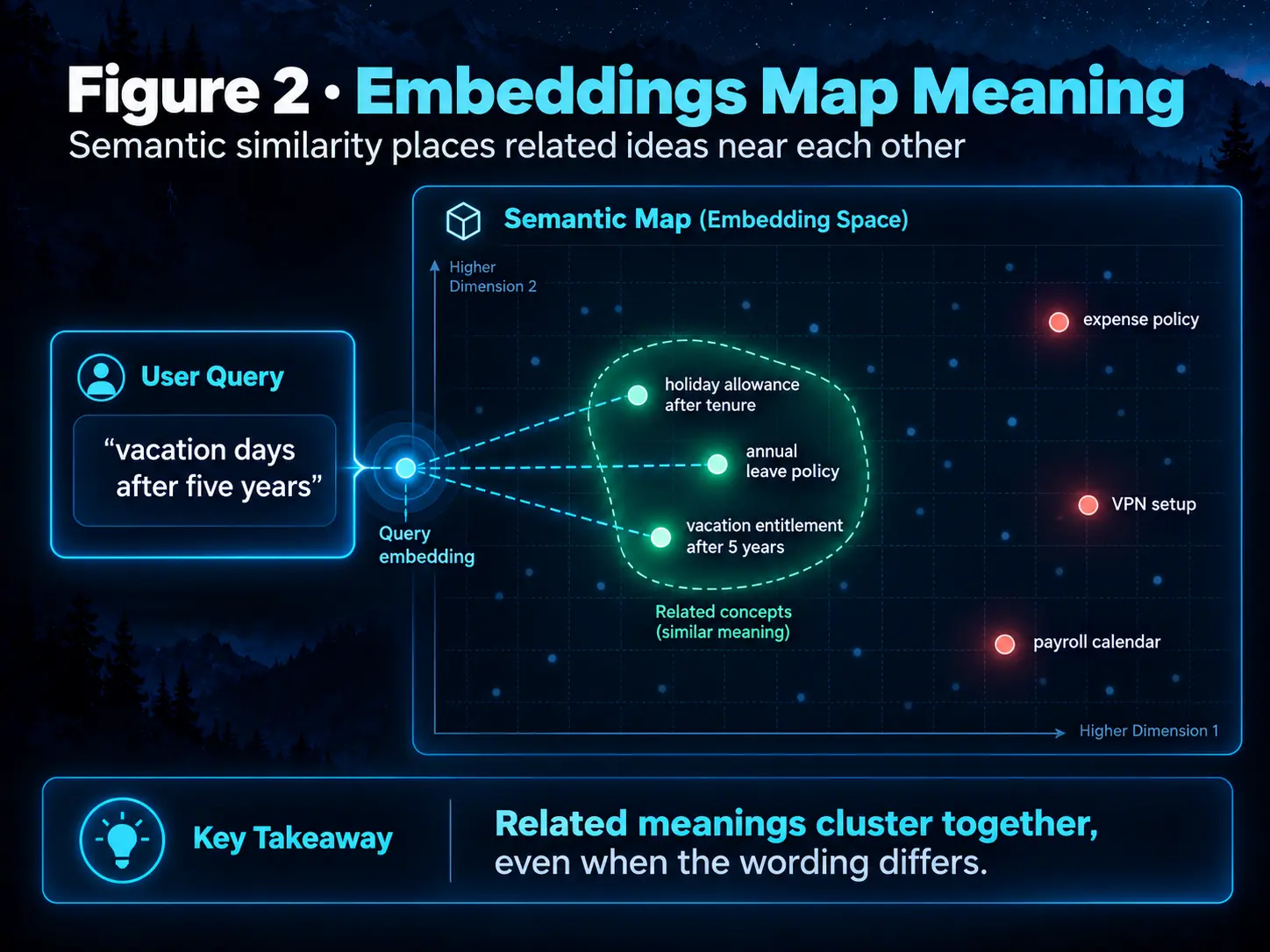
An embedding is a numeric representation designed so that texts with related meaning lie relatively close in vector space. A literal search for “change credentials” may miss “reset a user password”; semantic retrieval can connect them because the ideas are similar.
The embedding model and chat model have different jobs. One returns vectors; the other generates language. Open WebUI can use local SentenceTransformers or external embedding engines such as Ollama and OpenAI-compatible services.
06. Vector databases: where the index lives
A vector database answers a specialised question: “Which stored vectors are closest to this query vector?” The stored record also links each vector to its chunk text, source document and metadata so Open WebUI can reconstruct evidence and citations.
ChromaDB
Local ChromaDB is a practical starting point for one Open WebUI instance and a personal library. It avoids turning the first RAG experiment into an infrastructure project.
PGVector and scaled deployments
A local SQLite-backed Chroma client is not an appropriate shared store for multiple workers or replicas. A client-server vector database such as PGVector is a sensible production direction, especially when PostgreSQL already belongs to the stack. Multi-worker deployments also need shared storage, cache/session coordination and a deliberate ingestion architecture.
07. Retrieval and the context budget
A Knowledge Base may contain thousands of chunks. Retrieval reduces them to a small candidate set. Top K is the approximate number retained for the next stage: too low can omit the answer; too high can flood the prompt with noise.
context window =
system instructions + chat history + retrieved chunks
+ tool results + space for the answer
Five chunks of roughly 1,000 tokens already spend about 5,000 tokens. A retriever can find the right passage and still lose it later if the context budget trims evidence or leaves too little space for the response.
08. Hybrid Search and reranking
 Enlarge illustration ↗
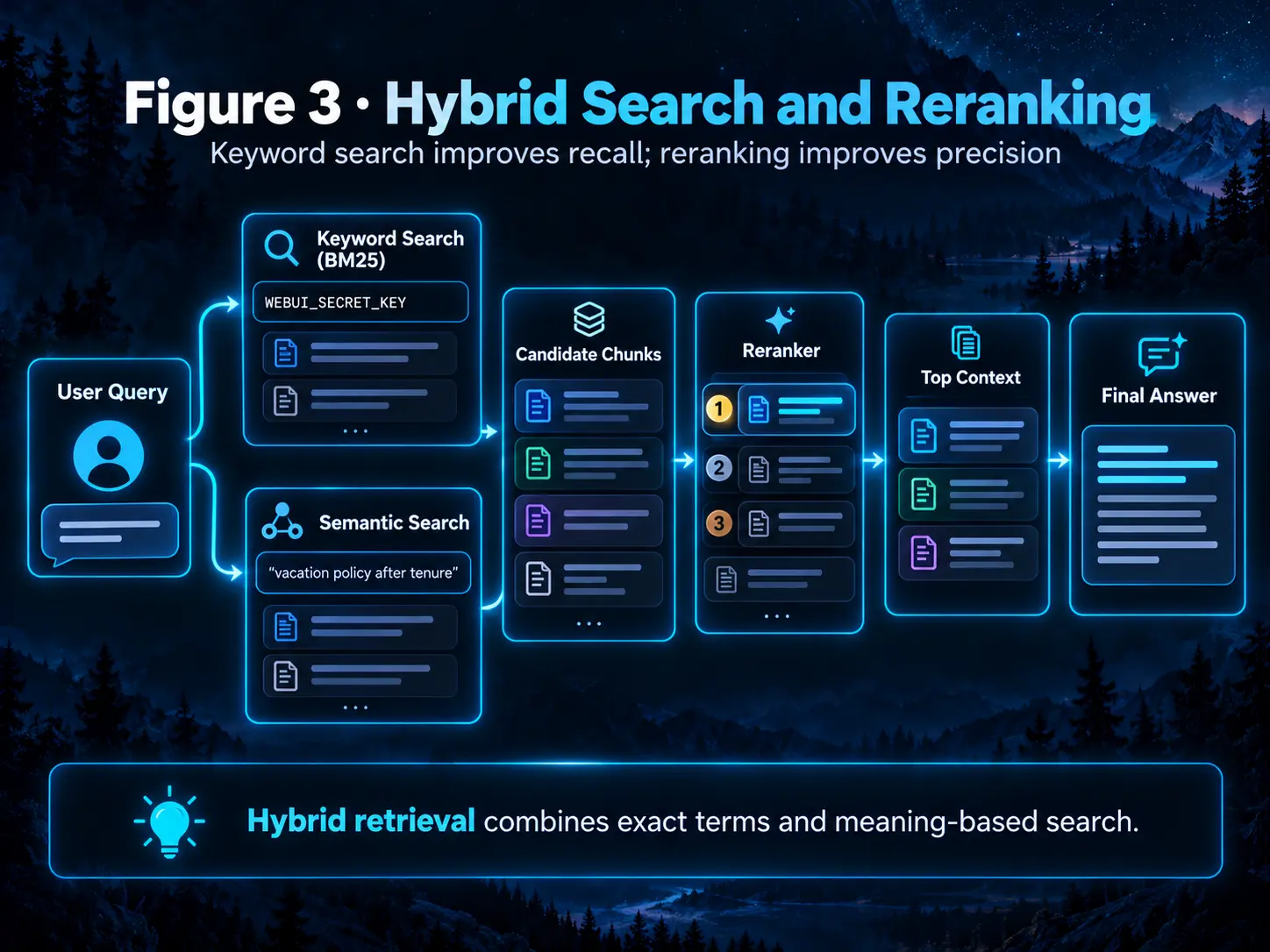
Vector search excels at paraphrases and concepts. BM25 excels at exact, rare strings such as SDEL-10257, WEBUI_SECRET_KEY or a specific error code. Hybrid Search combines both candidate pools.
A cross-encoder reranker then reads the query and each candidate together and assigns a new relevance score. This is more expensive than initial retrieval, so it normally operates on a limited pool.
ENABLE_RAG_HYBRID_SEARCH=true
# Optionally configure a reranking model in Admin → Documents
Semantic search finds concepts. BM25 finds strings. Reranking tries to keep the evidence that best answers this question.
09. Focused Retrieval versus Full Context
| Mode | What it does | Best fit |
|---|---|---|
| Focused Retrieval | Searches and injects only selected chunks. | Large documents, many files and collections. |
| Full Context | Injects the entire document without semantic selection. | Short documents that are always relevant and fit comfortably. |
Full Context is not automatically better. An 80,000-token document cannot fit inside a 16K model context. Conversely, a concise policy that fits easily may benefit from bypassing retrieval risk entirely.
10. Knowledge Bases versus one-off chat files
 Enlarge illustration ↗
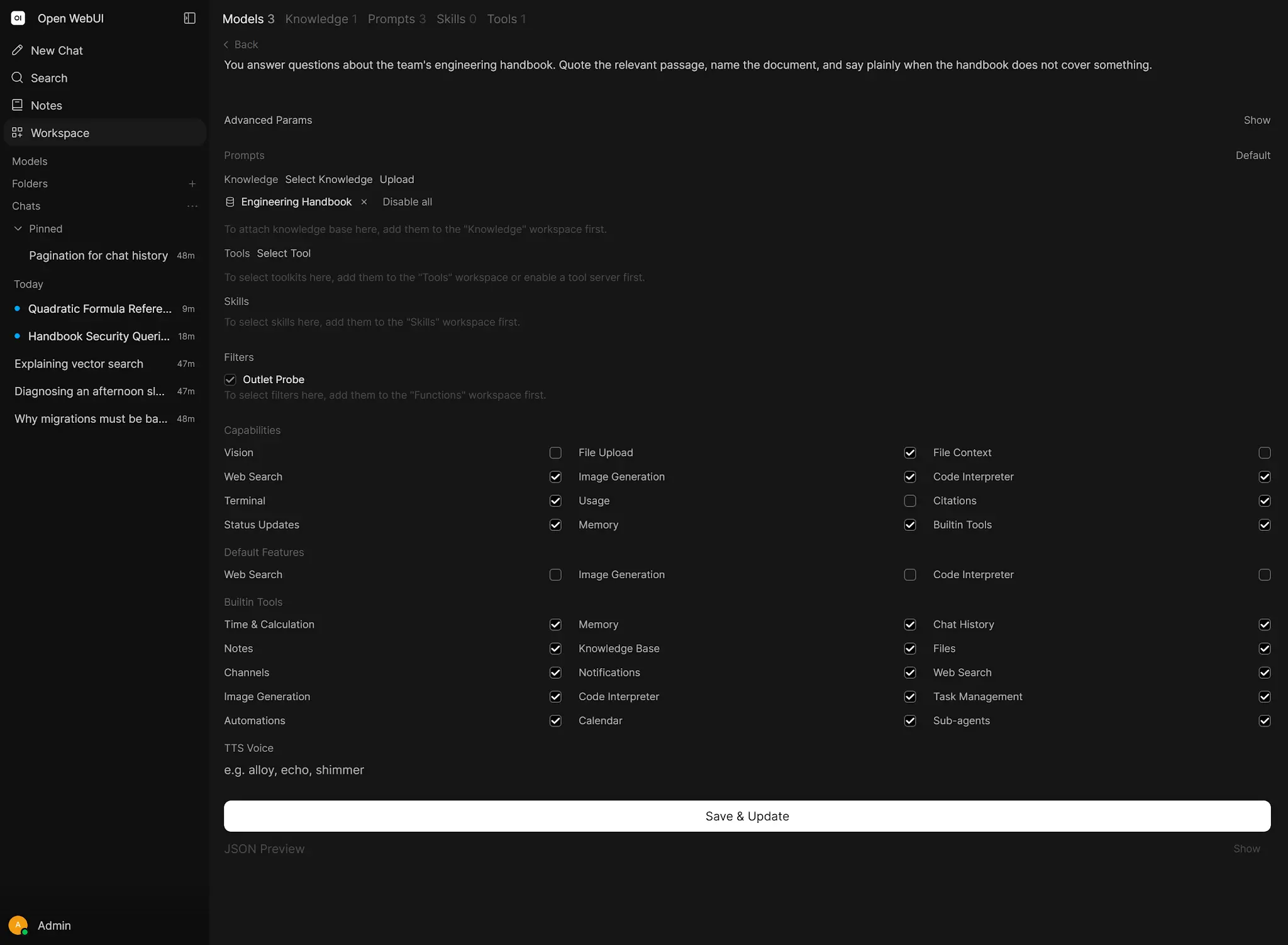
Attach a one-off file when it belongs only to the current conversation. Build a Knowledge Base for reusable manuals, API documentation, policies and process libraries that many chats or Workspace Models should query.
 Enlarge illustration ↗
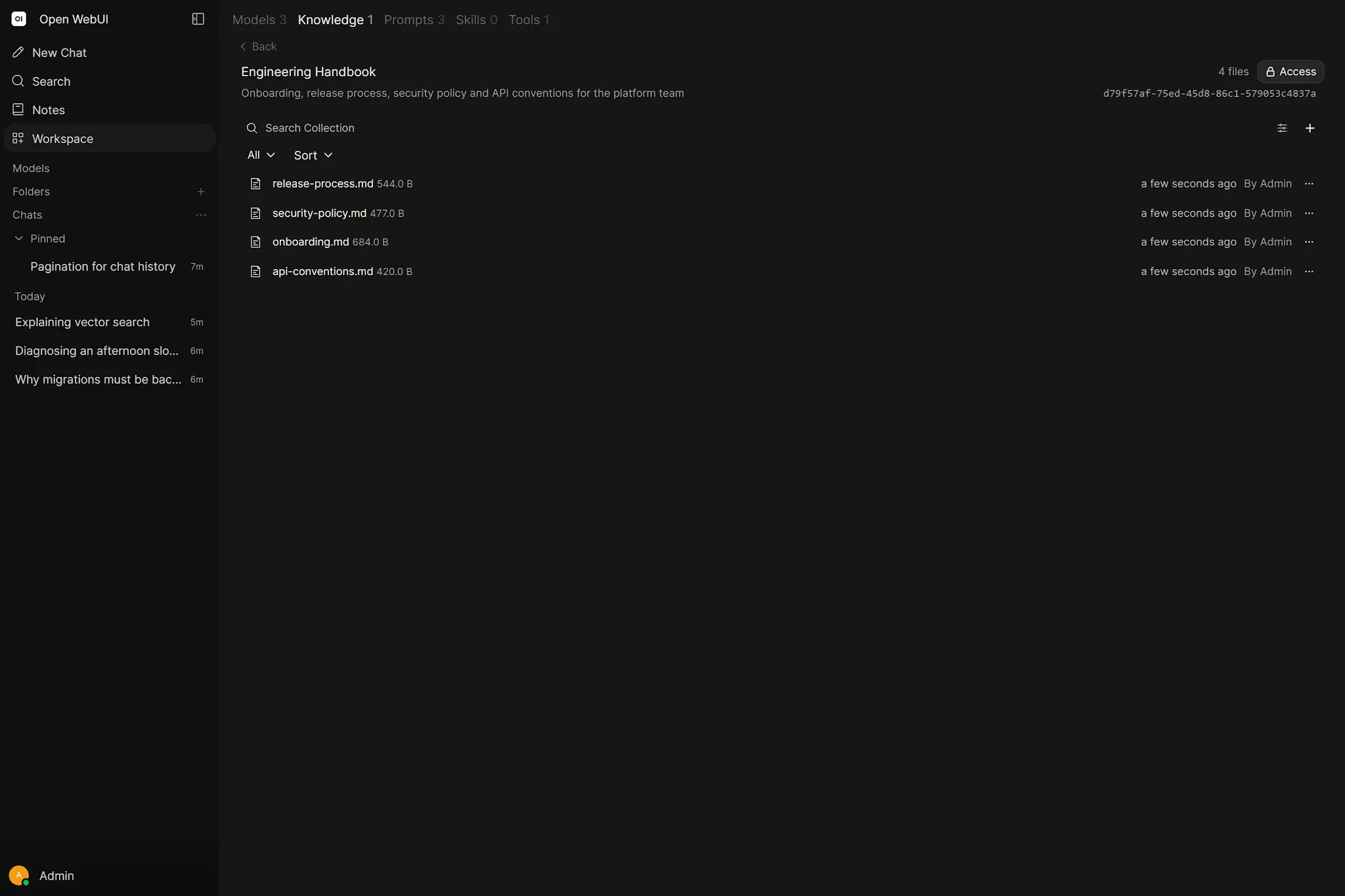
Nested folders organise the interface but do not necessarily divide the underlying vector search; retrieval may still cross the complete Knowledge Base. Treat permissions, ownership, update paths and citation expectations as part of the knowledge design.
11. Agentic retrieval: the model chooses what to read
With reliable native function calling, a model can decide when to search, which file to inspect and whether to retry using another method. In Native mode, attached Knowledge is not always injected wholesale; the model may need to call tools such as query_knowledge_files, grep_knowledge_files or view_file.
 Enlarge illustration ↗
- query_knowledge_files
- Semantic search when the concept is known but wording may differ.
- grep_knowledge_files
- Literal or regex search for identifiers, versions and exact strings.
- kb_exec
- Experimental filesystem-like navigation with commands such as tree, grep, cat, head and tail.
Agentic retrieval adds power and another failure mode: the model may select a poor query or stop after an empty result. Establish a reliable basic pipeline before adding more autonomous search.
12. Practical starting configurations
| Environment | Chunk / overlap | Top K | Guidance |
|---|---|---|---|
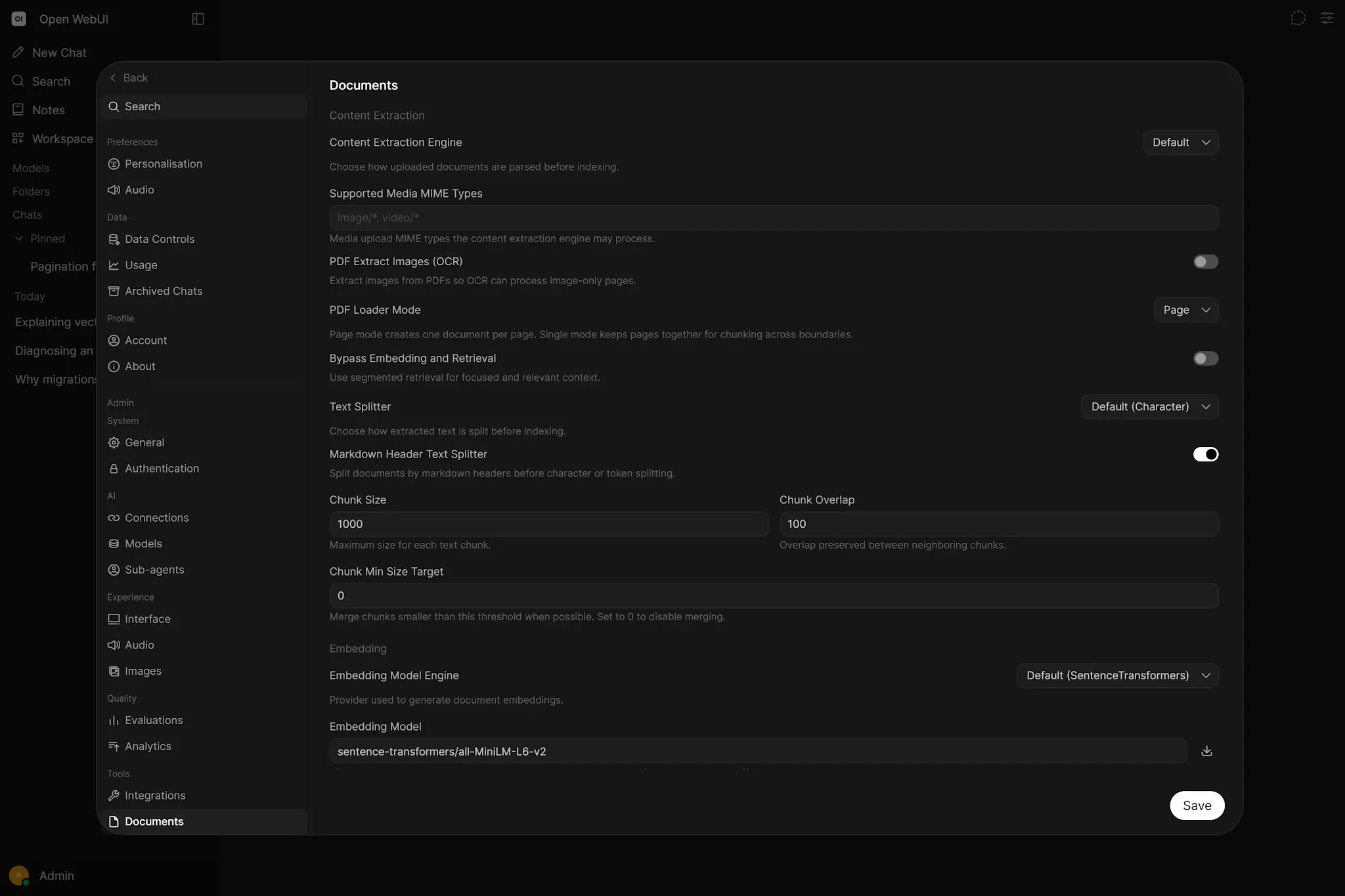
| Local model, ≤8K | ~1000 / 100 tokens | 3–5 | Token splitter, header splitting, avoid Full Context for large files. |
| Cloud or 32K+ | ~2000 / 200 tokens | 15–25 | Consider Full Context for genuinely small documents. |
| Mixed local/cloud | ~1500 / 200 tokens | ~10 | Balance evidence quality across both model classes. |
 Enlarge illustration ↗
These are baselines, not laws. Language, document structure, embedding model, question style and context length all change the optimum.
13. Change configuration without corrupting consistency
- Chunk size or overlap: new files use the new values; existing Knowledge files keep old chunks until Reindex.
- Embedding model: reindex all Knowledge Bases so stored and query vectors use the same model.
- Extractor: re-upload originals; Reindex uses already extracted text and does not repeat OCR or parsing.
- Standalone chat files: re-upload them after an embedding change; global Knowledge reindex does not rebuild them.
14. Troubleshooting RAG in pipeline order
| Symptom | Likely layer | First check |
|---|---|---|
| PDF appears empty | Extraction/OCR | Preview stored text; choose a better extractor and re-upload. |
| Document found, answer passage missed | Chunking/retrieval | Inspect boundaries, query wording, Top K and Hybrid Search. |
| Good source, bad answer | Model/prompt/context | Confirm evidence was not trimmed; test model and system prompt. |
| Exact ID is missed | Lexical retrieval | Use BM25, grep or kb_exec. |
| Everything is slow | Pipeline performance | Measure extraction, embeddings, vector search, reranking and generation separately. |
15. Practical lab: build a small RAG benchmark
- Create a Knowledge Base named
RAG-Lab. - Upload a familiar 5–15 page PDF.
- Preview the extracted text and choose three facts you can verify manually.
- Ask one literal question, then a paraphrase of it.
- Ask a question whose answer does not exist and observe whether the model abstains.
- Open the cited sources and compare them with the original.
- Change exactly one setting, reindex when required and repeat the same questions.
This small golden set is more valuable than copying an Internet configuration because it represents your own documents and questions.
PRACTICAL CHECKPOINT
Can you locate the failing layer?
- Does RAG modify model weights?
- Why can a perfect-looking scan yield no searchable text?
- When does BM25 beat vector search?
- What must happen after changing the embedding model?
- Why does changing the extractor require re-upload rather than only Reindex?
Check your answers
No: RAG supplies external context. Scans need OCR. Exact rare strings favour BM25. A new embedding model requires reindexing, while a new extractor requires re-upload because Reindex starts from stored extracted text.
16. Essential vocabulary
- RAG
- Retrieval-Augmented Generation: retrieve external evidence and use it as generation context.
- Extraction
- Turning a file into usable textual content.
- OCR
- Recognising text inside images or scans.
- Chunk
- A document fragment used as an indexing and retrieval unit.
- Embedding
- A numeric representation of semantic features.
- Vector database
- A store optimised for similarity search over vectors.
- BM25
- Keyword retrieval that rewards meaningful term matches.
- Reranker
- A second-stage model that reorders query–chunk candidates.
- Top K
- The number of leading retrieval results retained.
- Reindex
- Rebuild chunks and embeddings from stored extracted text.
Source and further reading
This edition preserves the chapter's teaching sequence and examples. Screenshots reflect the source edition; controls may move between releases.
Open the original chapter ↗Open WebUI Knowledge ↗Open WebUI RAG ↗RAG troubleshooting ↗