CHAPTER 08
Tools & Functions
Move from answers to deliberate, reviewable actions.
On this page
Faithful English web edition · Original chapter, structure and illustrations from the learning guide.
LEARNING OBJECTIVES
Move from fluent answers to controlled actions
By the end, you should be able to distinguish Tools from Functions, read and write a small Python Workspace Tool, connect an API through OpenAPI, explain MCP’s role, trace a tool call end to end and recognise which choices execute code inside a highly trusted boundary.
01. From answering to acting
A bare language model receives context and generates tokens. Even RAG mainly improves the context it receives. A Tool changes the system: the model can request a capability outside the prompt, observe its result and continue.
Model alone → reasons with available context
Model + Tool → can retrieve live state or request an action
If you ask for ticket INC-1042, a model without a connector can only repeat known context. A model with get_ticket(ticket_id) can request the current record, receive structured data and then explain the live status.
02. The Open WebUI tooling map
 Enlarge illustration ↗
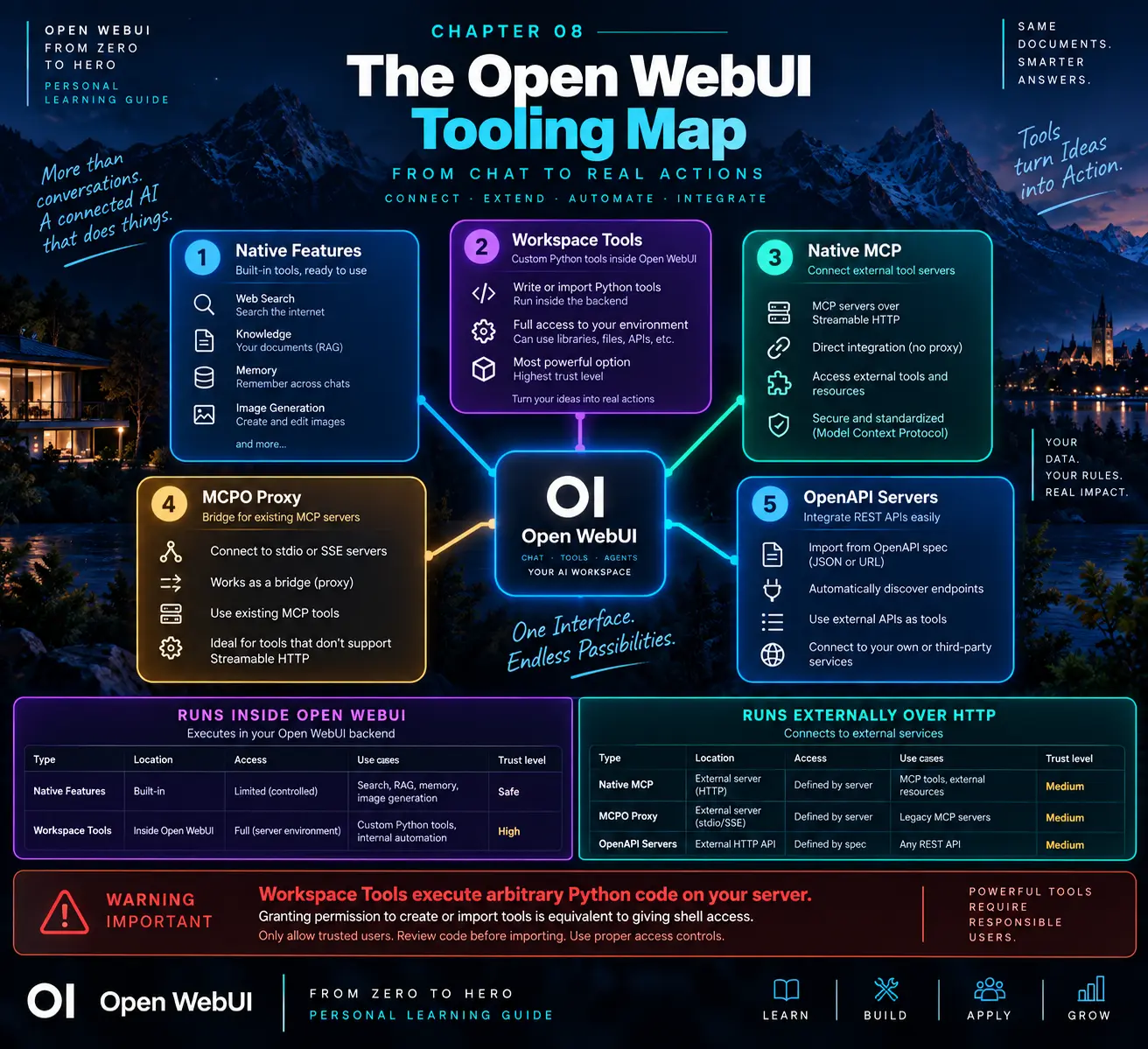
- Native features
- System capabilities such as Web Search, Knowledge, Memory and Image Generation.
- Workspace Tools
- Custom Python executed inside the Open WebUI backend.
- Native MCP
- External MCP servers connected over Streamable HTTP.
- MCPO
- A bridge that exposes stdio or older MCP servers through HTTP/OpenAPI.
- OpenAPI servers
- HTTP APIs whose documented operations become callable tools.
External services create a useful boundary: they can be isolated, scaled, authenticated and observed without installing every dependency inside the main Open WebUI container.
03. What really happens during a tool call
 Enlarge illustration ↗
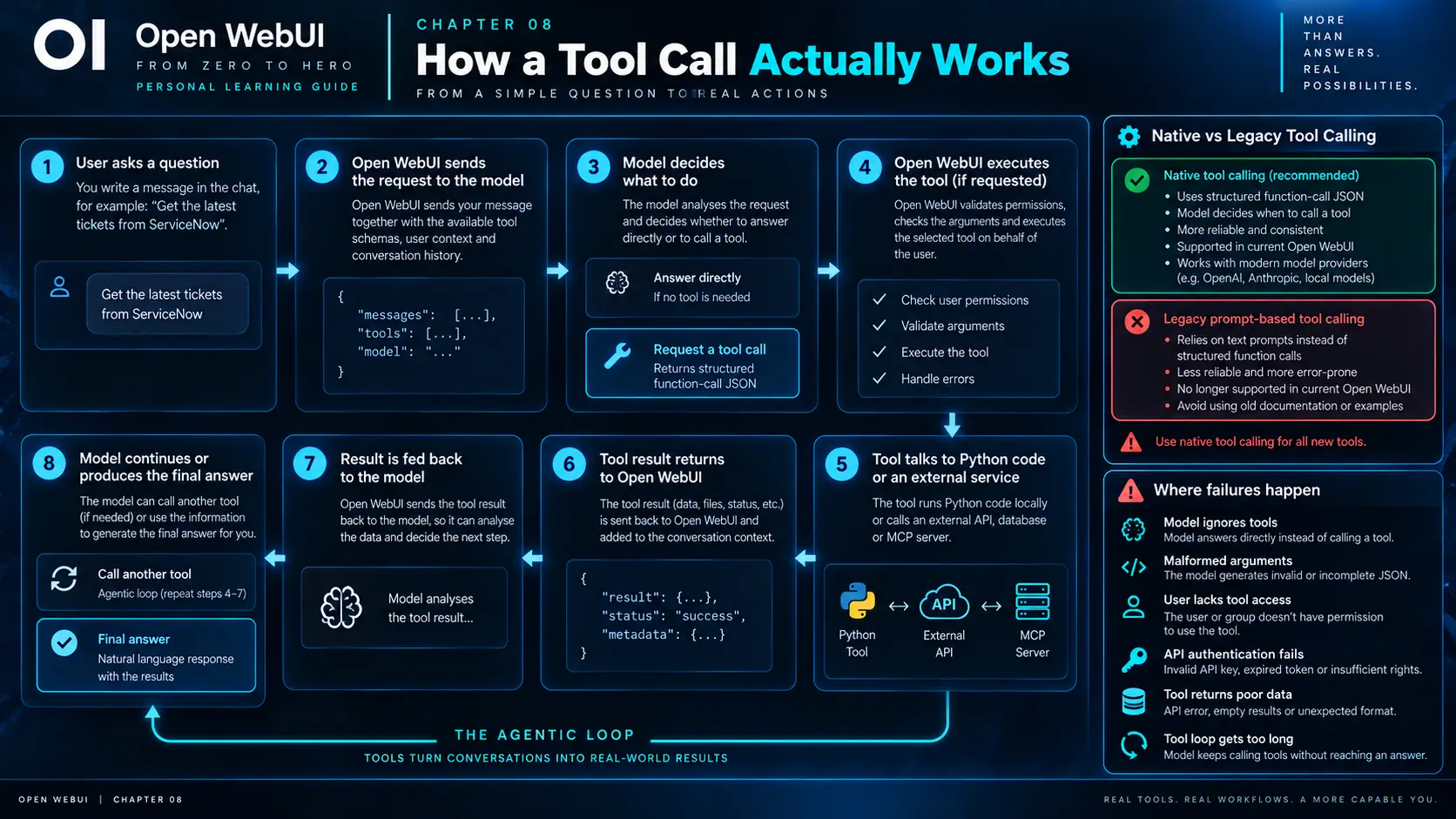
- The user sends a message.
- Open WebUI prepares history, context and available Tool schemas.
- The model either answers or returns a structured tool request.
- Open WebUI checks access and executes the named Tool.
- The Tool result is added to the model context.
- The model answers or requests another Tool.
The loop can continue until the model produces a final response or a configured limit stops it. This act–observe–decide cycle is the foundation of agentic behaviour.
04. Native tool calling versus Legacy
Native mode sends Tool definitions through the provider’s structured function-calling interface and receives typed calls in return. Legacy mode asked the model, through a large prompt, to imitate a Tool call in text and then attempted to parse that output.
Native mode is the supported default because it produces more reliable schemas, chains calls better, preserves KV-cache reuse and enables modern built-in capabilities.
05. Workspace Tools: Python inside Open WebUI
 Enlarge illustration ↗
A Workspace Tool is a Python module containing a class named Tools. Its public methods become operations the model can invoke. It is convenient because no separate service is required, but the code runs with the backend’s access to files, environment variables, packages and network.
06. Read and write a Tool
"""
title: Developer Utilities
author: Victor
description: Small utilities for analysis tasks
version: 1.0.0
"""
class Tools:
    async def calculate_percentage(
        self, part: float, total: float
    ) -> float:
        """
        Calculate what percentage part represents of total.
        :param part: The portion or completed amount.
        :param total: The full amount; it must not be zero.
        :return: Percentage value.
        """
        if total == 0:
            raise ValueError("total must not be zero")
        return (part / total) * 100
The class and signature
Open WebUI looks for Tools. Method names and type hints help generate the JSON schema sent to the model. calculate_percentage communicates intent more clearly than process.
The docstring is model-facing
The description and :param fields explain when the Tool applies and what each argument means. A technically correct Tool with ambiguous documentation can be selected badly.
Prefer async for I/O
Asynchronous methods avoid blocking the backend while waiting on a network service and match the recommended direction for future compatibility.
07. Valves, UserValves and reserved arguments
Do not hardcode API keys and URLs into Tool source. Valves hold server-managed configuration. UserValves hold per-user values when each person needs independent settings.
| Injected argument | Purpose |
|---|---|
__user__ | Current user identity and metadata. |
__metadata__ | Chat, session, file and request metadata. |
__messages__ | Conversation history. |
__files__ | Attached files. |
__model__ | Current model information. |
__oauth_token__ | A valid per-user OAuth token when configured. |
Server-side injection can let a Tool act for the authenticated user without placing the credential in the model’s prompt. Return only the data needed for the task.
08. OpenAPI: turn a REST API into Tools
If the business capability already exists behind HTTP, do not duplicate it inside a Workspace Tool. An OpenAPI document describes operations, parameters, types and responses so Open WebUI can expose endpoints such as:
GET   /tickets/{ticket_id}
POST  /tickets
PATCH /tickets/{ticket_id}
This keeps business logic in a testable service and allows normal gateways, authentication, rate limits, audit logs, observability and deployment controls. Use unique, descriptive operationId values because they become part of the model-facing tool interface.
Why the boundary is clean
- The API can be tested without an LLM.
- Server-side validation owns the security decision.
- Dependencies and scaling stay outside Open WebUI.
- Errors use explicit HTTP status codes and structured JSON.
09. MCP: connect external tool servers
 Enlarge illustration ↗
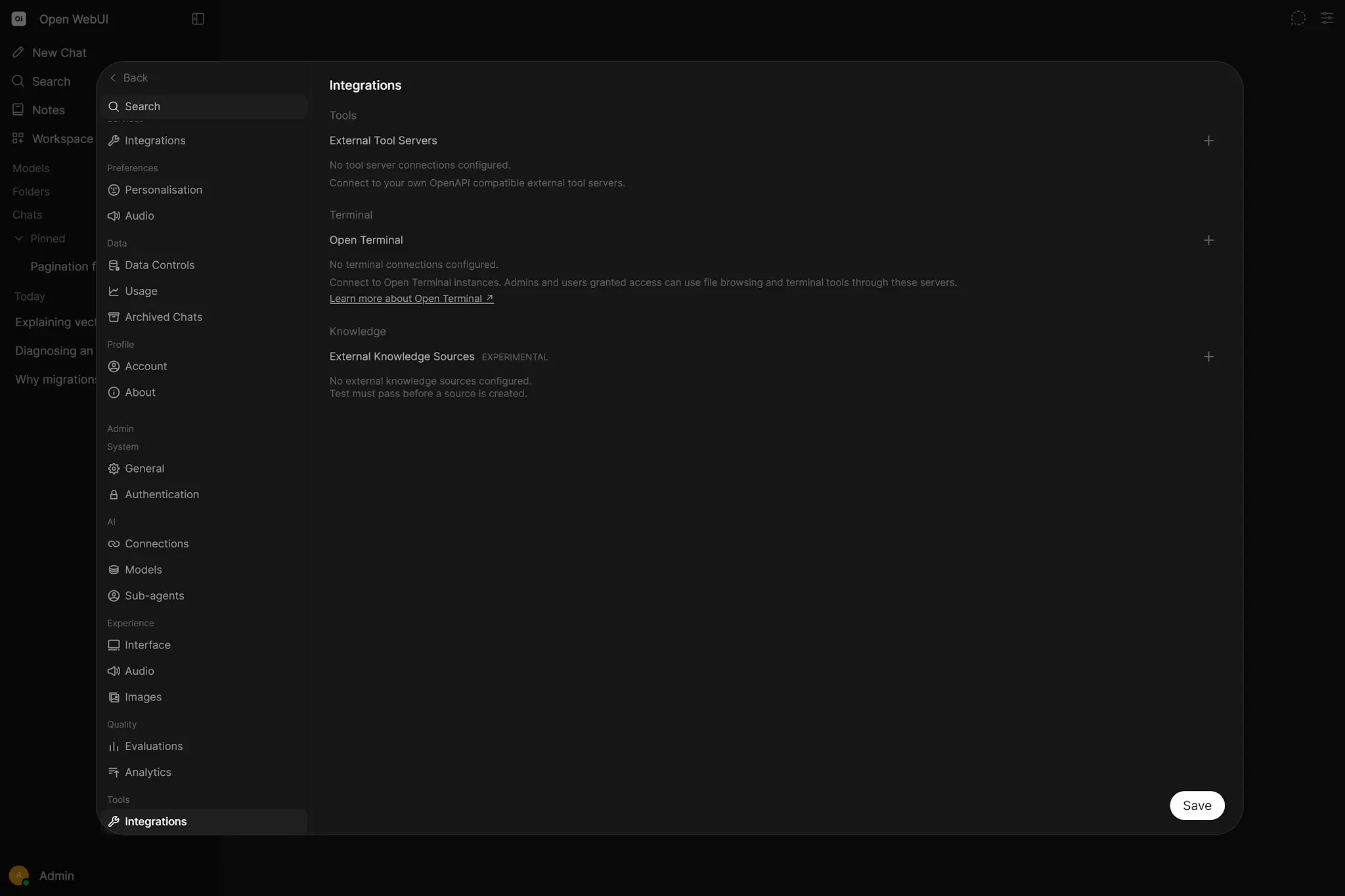
Model Context Protocol standardises how AI hosts discover Tools and resources. Open WebUI supports native MCP through Streamable HTTP. Administrators register servers, then access control decides which users or groups may use them.
For OAuth-backed MCP, WEBUI_SECRET_KEY protects stored client and token material. If that key changes when a container is recreated, existing encrypted credentials may become unreadable and require authorisation again.
Servers that only speak stdio cannot connect directly to the web backend; MCPO can run them and publish an HTTP/OpenAPI surface.
10. MCP, OpenAPI or Workspace Tool?
| Choice | Use it when | Trust boundary |
|---|---|---|
| Workspace Tool | Small prototype, deep Open WebUI integration or tightly server-managed logic. | Code runs inside the backend; highest trust. |
| OpenAPI | A REST service already exists or conventional enterprise controls matter. | External HTTP service with its own identity and policy. |
| MCP | The provider already offers MCP or the same capability should serve multiple AI hosts. | External MCP server; protocol designed for AI clients. |
External business logic belongs behind API or MCP. Deeply internal Open WebUI behaviour may justify a Python Tool or Function.
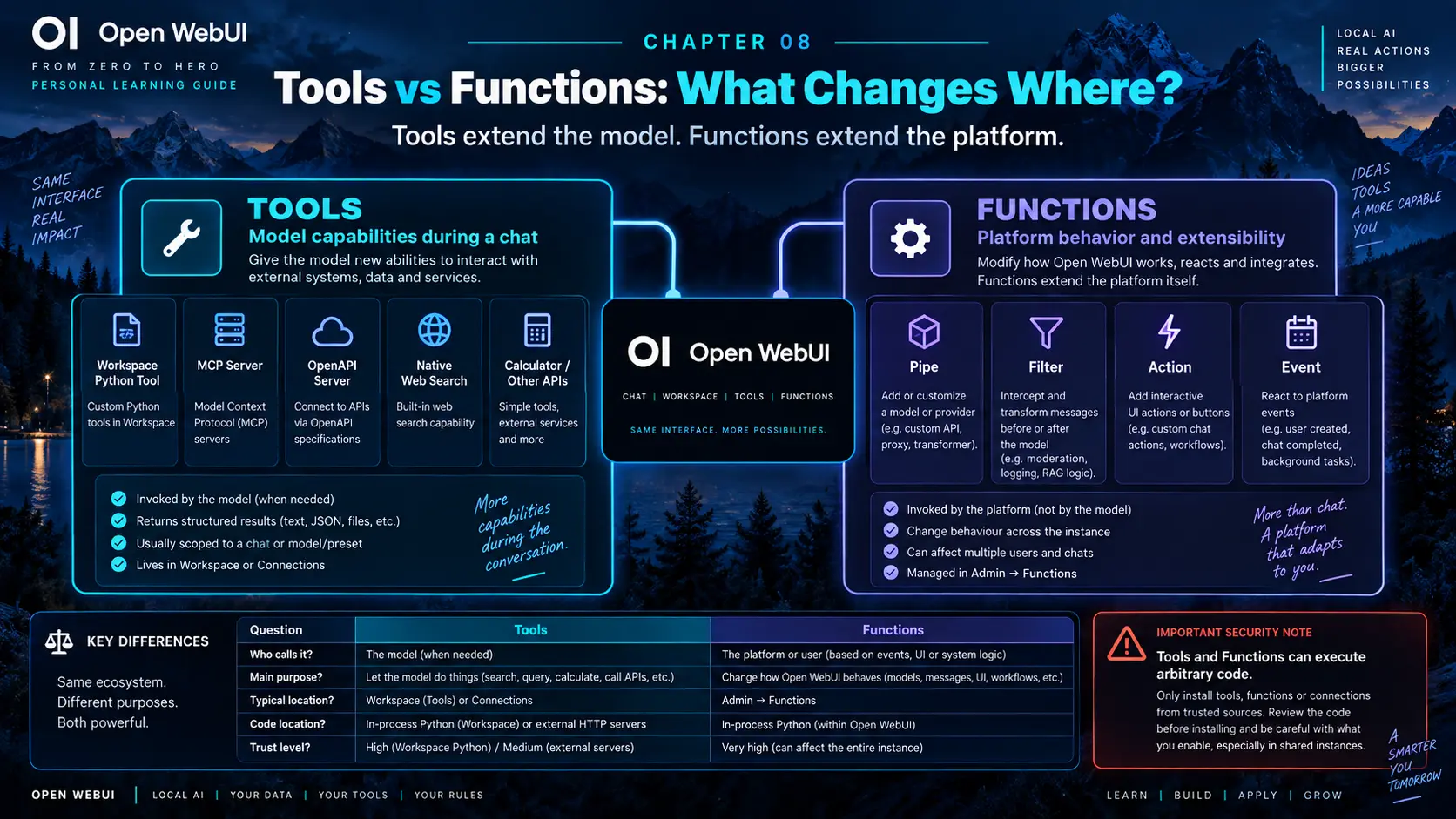
11. Functions extend the platform
 Enlarge illustration ↗
- Pipe
- Appears as a selectable model and controls the complete request path. It can route providers or implement a specialised agent.
- Filter
- Intercepts input, stream or output for redaction, moderation, translation, logging, metrics or policy.
- Action
- Adds a user-triggered button to a message, such as export, send or start a workflow.
- Event
- Reacts to lifecycle events such as user creation, chat deletion, startup or configuration change.
Functions are admin-only Python. A global Filter can affect every conversation; an Event can execute automatically. Review and operate them like backend extensions, not like harmless prompt snippets.
12. Open Terminal and code execution
Open Terminal gives an agent a shell, filesystem, package environment, process management and file-search tools. Unlike Python embedded in the main backend, it can be placed in a deliberately isolated execution environment.
For development, a useful architecture is Open WebUI as control plane, a reliable tool-calling model as planner, an isolated Open Terminal container as action layer and only the required repository paths mounted inside.
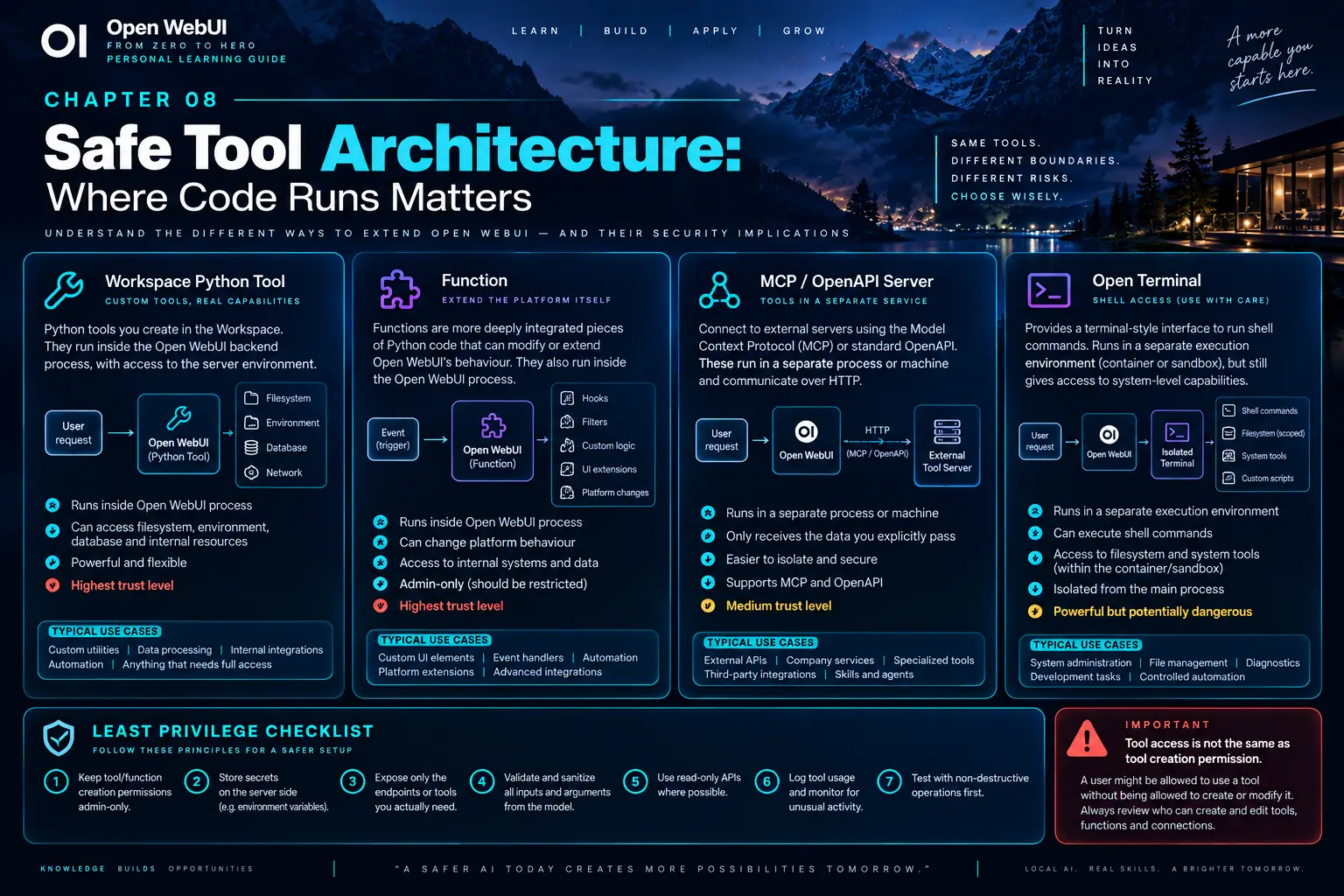
13. Security and trust architecture
 Enlarge illustration ↗
- Separate permission to use a Tool from permission to create one.
- Expose only the operations an assistant needs.
- Prefer read-only endpoints before adding writes.
- Validate all values and authorisation server-side.
- Keep secrets out of prompts and Tool descriptions.
- Log sensitive calls and return small structured results.
- Isolate heavy or high-risk execution in external services.
14. Troubleshooting Tools
| Symptom | Checks |
|---|---|
| Model never calls the Tool | Enable it, verify grants, clarify name/docstring, use Native mode and test a capable model. |
| Arguments are invalid | Add precise type hints, constraints, enums and smaller operations. |
| Manual call works; Open WebUI fails | Inspect user permissions, auth scopes, backend/tool logs, CORS, proxy, DNS and connection type. |
| Agent loops | Return an explicit completion signal, remove overlapping Tools and set step limits. |
15. Project: a Technical Support Assistant
Assemble a small assistant with a tool-capable base model, a system policy that forbids invented live state, Knowledge containing runbooks and three read-only operations:
get_ticket(ticket_id)
get_service_status(service_name)
search_known_incidents(query)- Consult Knowledge for documented procedures.
- Call a Tool only when live state is required.
- Follow related identifiers with a second call when justified.
- Separate current system facts from documented recommendations.
- Grant ordinary users use access; reserve Tool creation and connection changes for administrators.
Knowledge and Tools are complementary: Knowledge supplies durable documentary context; Tools supply dynamic state and bounded actions.
16. Essential vocabulary
- Tool
- A capability the model can request during a conversation.
- Tool schema
- The structured name, description, parameters and types shown to the model.
- Native tool calling
- Provider-supported structured function calling.
- Workspace Tool
- A Python
Toolsclass executed in the Open WebUI backend. - Valves
- Persistent server-side configuration for a Tool or Function.
- OpenAPI
- A standard contract for HTTP APIs.
- MCP
- A protocol for exposing Tools and resources to AI hosts.
- MCPO
- A bridge that exposes MCP servers through an HTTP/OpenAPI interface.
- Pipe / Filter / Action / Event
- Function types that extend Open WebUI platform behaviour.
Source and further reading
This edition preserves the chapter's teaching sequence and examples. Screenshots reflect the source edition; controls may move between releases.
Open the original chapter ↗Tools ↗Functions ↗MCP ↗Plugin security ↗